
Juniper
JN0-351 · Question #32
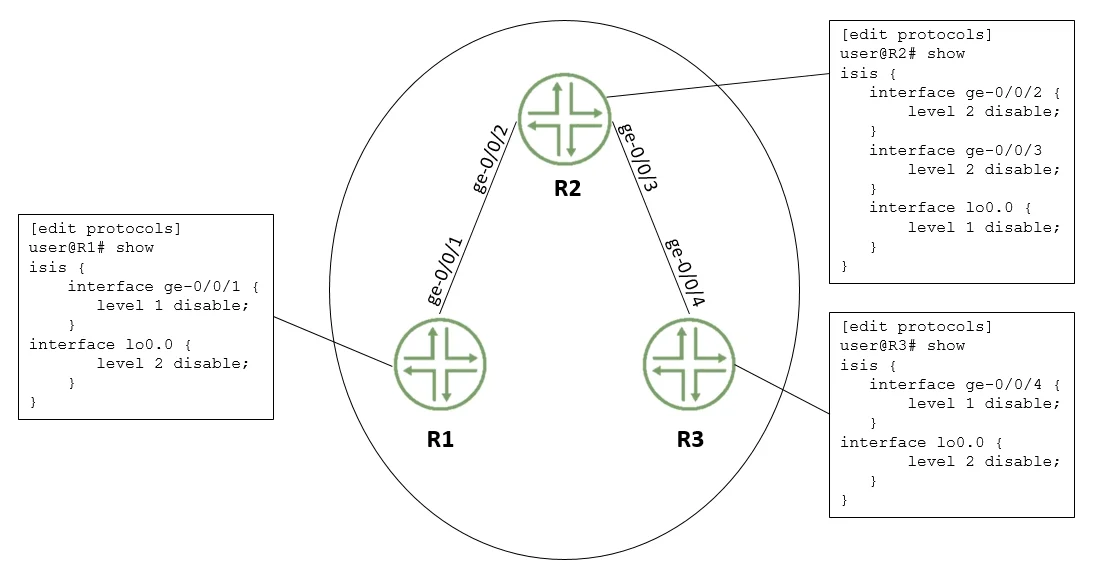
Referring to the exhibit, which two configuration changes must you apply for packets to reach from R1 to R3 using IS-IS? (Choose two.)
Sign in or unlock JN0-351 to reveal the answer and full explanation for question #32. The question stem and answer options stay visible for context.
IS-IS
Question
Referring to the exhibit, which two configuration changes must you apply for packets to reach from R1 to R3 using IS-IS? (Choose two.)
Exhibit
Options
- AOn R1, enable Level 1 on the ge-0/0/1 interface. In IS-IS, both levels (Level 1 and Level 2) are
- BOn R3 disable Level 2 on the ge-0/0/4 interface.
- COn R1, disable Level 2 on the ge-0/0/1 interface.
- DOn R3 enable Level 1 on the ge-0/0/4 interface Similarly, enabling Level 1 on the ge-0/0/4
Unlock JN0-351 to see the answer
You've previewed enough free JN0-351 questions. Unlock JN0-351 for full answers, explanations, the timed quiz mode, progress tracking, and the master PDF. Question stem and options stay visible so you can still see what's on the exam.
Topics
#IS-IS levels#Level 1#Level 2#adjacency configuration