
JN0-351 · Question #146
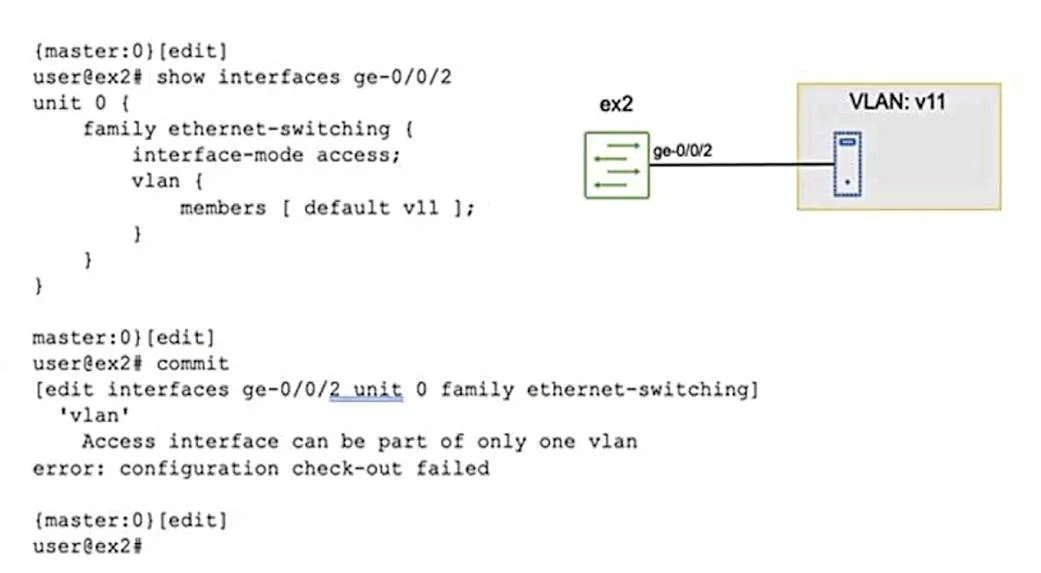
Which command solves the error that you see in the exhibit?
The correct answer is A. delete ge-0/0/2 unit 0 family ethernet-switching vlan members default. The error in the exhibit occurs because an access interface can only be a member of one VLAN, but it is currently configured with the "default" VLAN and is trying to be added to VLAN "v11." To resolve the issue, the correct command is: delete ge-0/0/2 unit 0 family…
Question
Which command solves the error that you see in the exhibit?
Exhibit
Options
- Adelete ge-0/0/2 unit 0 family ethernet-switching vlan members default
- Bset ge-0/0/2 unit 0 family ethernet-switching vlan members [default v11]
- Cdelete ge-0/0/2 unit 0 family ethernet-switching vlan members all
- Dset ge-0/0/2 unit 0 family ethernet-switching vlan members all
How the community answered
(30 responses)- A80% (24)
- B3% (1)
- C13% (4)
- D3% (1)
Explanation
The error in the exhibit occurs because an access interface can only be a member of one VLAN, but it is currently configured with the "default" VLAN and is trying to be added to VLAN "v11." To resolve the issue, the correct command is: delete ge-0/0/2 unit 0 family ethernet-switching vlan members default This command removes the interface from the "default" VLAN, allowing it to be part of VLAN "v11" as intended.
Topics
Community Discussion
No community discussion yet for this question.