
Juniper
JN0-349 · Question #86
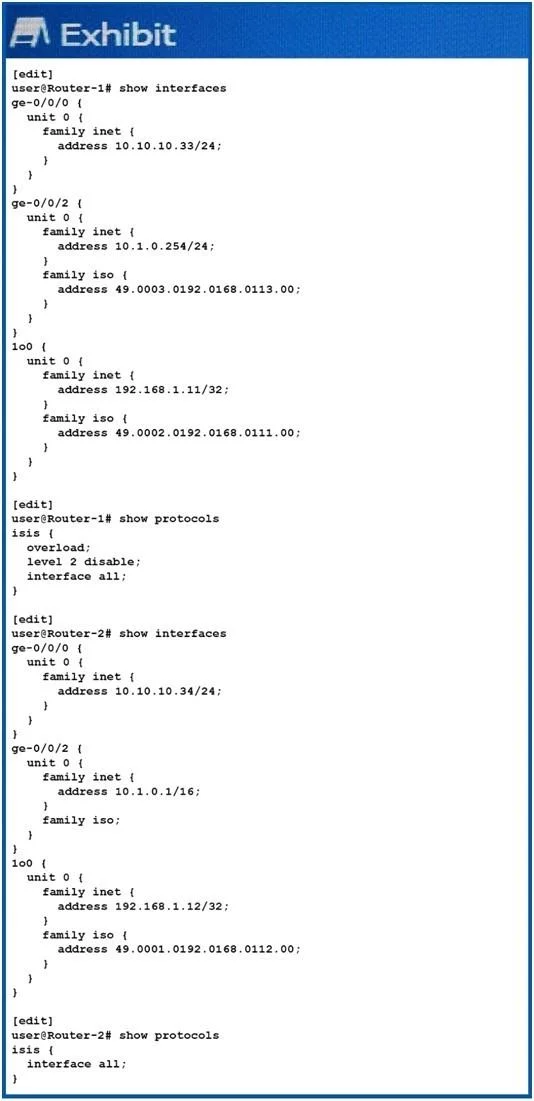
Referring to the exhibit, Router-1 and Router-2 are failing to form an IS-IS adjacency. What should you do to solve the problem?
The correct answer is D. Change the ISO areas on the Io0 interfaces to match on both routers. ISO address are not in the same area and level 2 is disabled on router-1. So, you have to change the ISO area values to match on both routers.
IS-IS
Question
Referring to the exhibit, Router-1 and Router-2 are failing to form an IS-IS adjacency. What should you do to solve the problem?
Exhibit
Options
- ARemove the overloaded statement from Router-1.
- BChange the IP subnet masks to match on the ge-0/0/2 interfaces of both routers.
- CRemove the ISO address from ge-0/0/2 on Router-1.
- DChange the ISO areas on the Io0 interfaces to match on both routers.
How the community answered
(44 responses)- A11% (5)
- B7% (3)
- C2% (1)
- D80% (35)
Explanation
ISO address are not in the same area and level 2 is disabled on router-1. So, you have to change the ISO area values to match on both routers.
Topics
#IS-IS adjacency#ISO area mismatch#NET address#troubleshooting
Community Discussion
No community discussion yet for this question.