
Juniper
JN0-349 · Question #114
Click the Exhibit button. You have an ESXi host that is connected to ge-0/0/23 on a Juniper EX Series switch. You added a new VM that will also use the same ge-0/0/23 interface. Unfortunately, the…
Sign in or unlock JN0-349 to reveal the answer and full explanation for question #114. The question stem and answer options stay visible for context.
Question
Click the Exhibit button. You have an ESXi host that is connected to ge-0/0/23 on a Juniper EX Series switch. You added a new VM that will also use the same ge-0/0/23 interface. Unfortunately, the new VM is not able to reach external devices. Referring to the exhibit, which command would solve this problem?
Exhibit
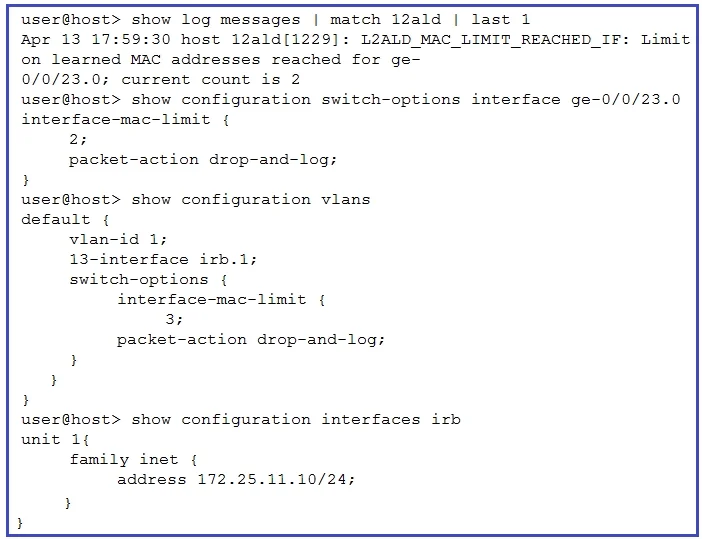
Options
- Aset vlans default switch-options interface-mac-limit 4
- Bset vlans default switch-options interface-mac-limit 5
- Cset switch-options interface ge-0/0/23.0 interface-mac-limit 3
- Dclear ethernet-switching recovery-timeout interface ge-0/0/23.0
Unlock JN0-349 to see the answer
You've previewed enough free JN0-349 questions. Unlock JN0-349 for full answers, explanations, the timed quiz mode, progress tracking, and the master PDF. Question stem and options stay visible so you can still see what's on the exam.