
Juniper
JN0-343 · Question #176
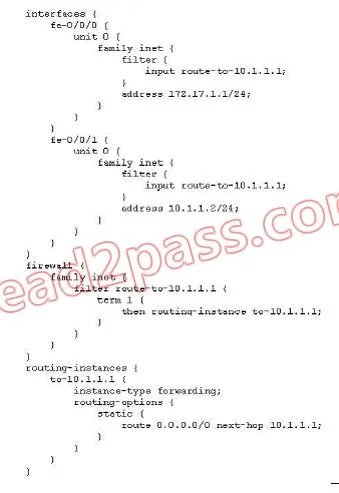
Click the Exhibit button. A router is configured with the configuration shown in the exhibit. Traffic arriving on fe-0/0/0.0 is not being routed to 10.1.1.1. What can you change to make the device…
Sign in or unlock JN0-343 to reveal the answer and full explanation for question #176. The question stem and answer options stay visible for context.
Question
Click the Exhibit button. A router is configured with the configuration shown in the exhibit. Traffic arriving on fe-0/0/0.0 is not being routed to 10.1.1.1. What can you change to make the device route traffic arriving on fe- 0/0/0.0 to 10.1.1.1?
Exhibit
Options
- AAdd filter-based-forwarding enable to the configuration.
- BEnsure that the to-10.1.1.1 routing instance has a route to 10.1.1.1.
- CAdd a from statement to the route-to-10.1.1.1 filter.
- DExplicitly configure an interface in the default route in the to-10.1.1.1 routing instance.
Unlock JN0-343 to see the answer
You've previewed enough free JN0-343 questions. Unlock JN0-343 for full answers, explanations, the timed quiz mode, progress tracking, and the master PDF. Question stem and options stay visible so you can still see what's on the exam.