
JN0-334 · Question #79
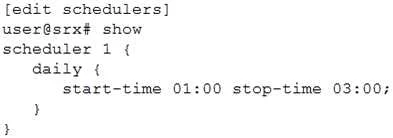
Click the Exhibit button. You have configured the scheduler shown in the exhibit to prevent users from accessing certain websites from 1:00 PM to 3:00 PM Monday through Friday. This policy will…
Sign in or unlock JN0-334 to reveal the answer and full explanation for question #79. The question stem and answer options stay visible for context.
Question
Click the Exhibit button. You have configured the scheduler shown in the exhibit to prevent users from accessing certain websites from 1:00 PM to 3:00 PM Monday through Friday. This policy will remain in place until further notice. When testing the policy, you determine that the websites are still accessible during the restricted times. In this scenario, which two actions should you perform to solve the problem? (Choose two.)
Exhibit
Options
- AAdd the saturday exclude parameter and the sunday exclude parameter to ensure weekends
- BUse the 13:00 parameter and the 15:00 parameter when specifying the time.
- CUse the start-date parameter to specify the date for each Monday and use the stop-date
- DUse the PM parameter when specifying the time in the schedule.
Unlock JN0-334 to see the answer
You've previewed enough free JN0-334 questions. Unlock JN0-334 for full answers, explanations, the timed quiz mode, progress tracking, and the master PDF. Question stem and options stay visible so you can still see what's on the exam.