
JN0-105 · Question #76
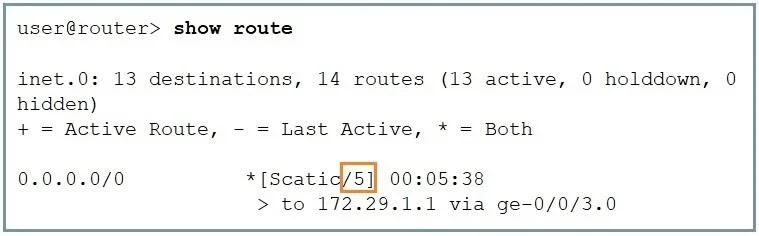
Click the Exhibit button. Referring the exhibit, what does the highlighted number indicate?
The correct answer is A. route preference is 5. In the exhibit shown, the highlighted number next to the route type (Static) within the square brackets indicates the route preference, also known as the administrative distance. In Junos, the route preference is a value that determines the priority of the route source. Lower…
Question
Click the Exhibit button. Referring the exhibit, what does the highlighted number indicate?
Exhibit
Options
- Aroute preference is 5
- Bhop count is 5
- Ccost is 5
- Dmetric is 5
How the community answered
(52 responses)- A71% (37)
- B4% (2)
- C10% (5)
- D15% (8)
Explanation
In the exhibit shown, the highlighted number next to the route type (Static) within the square brackets indicates the route preference, also known as the administrative distance. In Junos, the route preference is a value that determines the priority of the route source. Lower numbers indicate a higher priority when the routing table is being calculated. The route preference is used to select the best route when multiple paths to the same destination exist from different routing sources. The number 5 is unusually low for a static route by default, suggesting it has been manually configured to override other route types.
Topics
Community Discussion
No community discussion yet for this question.