
JN0-105 · Question #63
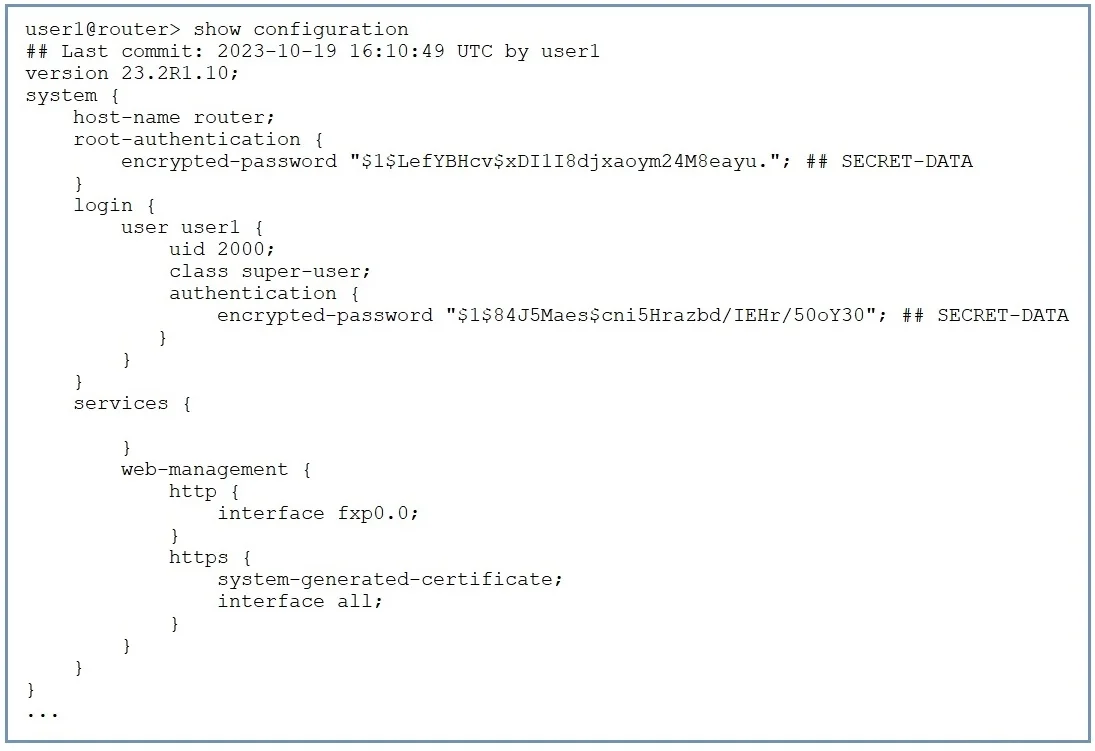
You are unable to remotely access your Juniper device using the CLI. Referring to the exhibit, which command would you add to the existing configuration to enable remote CLI access?
The correct answer is C. set system services ssh. In Junos OS, remote access to the device's CLI is commonly facilitated through Secure Shell (SSH), a protocol providing secure command-line access over an insecure network. The given exhibit indicates an attempt to set a root authentication password but does not show…
Question
You are unable to remotely access your Juniper device using the CLI. Referring to the exhibit, which command would you add to the existing configuration to enable remote CLI access?
Exhibit
Options
- Aload factory-default
- Bset system root-authentication plain-text-password
- Cset system services ssh
- Dset system login idle-timeout 20
How the community answered
(37 responses)- A11% (4)
- B5% (2)
- C81% (30)
- D3% (1)
Explanation
In Junos OS, remote access to the device's CLI is commonly facilitated through Secure Shell (SSH), a protocol providing secure command-line access over an insecure network. The given exhibit indicates an attempt to set a root authentication password but does not show configuration for enabling remote access services. To enable SSH, which is not shown in the configuration snippet, you need to configure the device to accept SSH connections. This is done by enabling the SSH service within the system services hierarchy of the configuration. The correct command to add to the existing configuration for enabling remote CLI access via SSH is set system services ssh. This command activates the SSH service, allowing secure remote logins to the
Topics
Community Discussion
No community discussion yet for this question.