
JN0-102 · Question #413
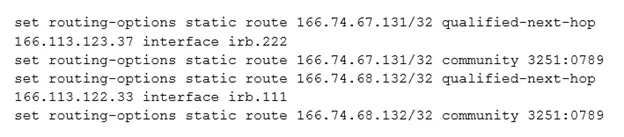
Click the Exhibit. Your configuration contains the static routes shown in the exhibit. Which command will successfully remove the 166.74.67.131 static route?
The correct answer is C. delete routing-options static route 166.74.67.131/32. To successfully remove a static route from the Junos OS configuration, the delete command must precisely specify the route's destination prefix within the routing-options static route hierarchy.
Question
Click the Exhibit. Your configuration contains the static routes shown in the exhibit. Which command will successfully remove the 166.74.67.131 static route?
Exhibit
Options
- Adelete routing-options static route 166.74.67.131/32 qualified- next-hop 166.113.123.37
- Bdelete routing-options static route 166.74.67.131/32 qualified-next-hop
- Cdelete routing-options static route 166.74.67.131/32
- Ddelete routing-options static route 166.74.67.131/32 qualified-next-hop 166.113.123.37
How the community answered
(25 responses)- A12% (3)
- B4% (1)
- C80% (20)
- D4% (1)
Why each option
To successfully remove a static route from the Junos OS configuration, the `delete` command must precisely specify the route's destination prefix within the `routing-options static route` hierarchy.
The command attempts to delete the entire route by also specifying an attribute of the route (`qualified-next-hop`), which is unnecessary and incorrect syntax for deleting the route itself.
The command `delete routing-options static route 166.74.67.131/32 qualified-next-hop` would attempt to delete only the `qualified-next-hop` attribute from the specified route, not the route entirely.
The `delete routing-options static route 166.74.67.131/32` command is the correct and most straightforward way to remove a specific static route in Junos OS by targeting its destination prefix.
This option is identical to A; specifying an attribute like `qualified-next-hop` when deleting the entire route by its prefix is incorrect syntax for full route removal.
Concept tested: Junos static route deletion
Source: https://www.juniper.net/documentation/us/en/software/junos/static-routing/topics/topic-map/static-routes-configuring.html
Topics
Community Discussion
No community discussion yet for this question.