
JN0-102 · Question #328
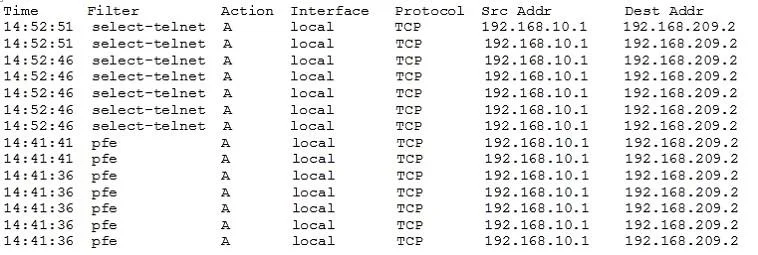
Which command produces the output shown in the exhibit?
The correct answer is B. show firewall log. The show firewall log command displays detailed log entries for packets that have triggered a log action within a firewall filter. This command provides specific information about network traffic evaluated by the firewall.
Question
Which command produces the output shown in the exhibit?
Exhibit
Options
- Ashow firewall counter telnet-counter filter select-telnet
- Bshow firewall log
- Cshow log messages
- Dshow services accounting usage
How the community answered
(55 responses)- A2% (1)
- B95% (52)
- C2% (1)
- D2% (1)
Why each option
The `show firewall log` command displays detailed log entries for packets that have triggered a `log` action within a firewall filter. This command provides specific information about network traffic evaluated by the firewall.
The `show firewall counter` command displays statistical counts for packets that match specific firewall filter terms, not detailed log entries.
The `show firewall log` command is specifically designed to display the contents of the firewall filter log buffer, which stores information about packets that match a firewall filter term with the `log` action.
The `show log messages` command displays general system log messages, which might include firewall events if configured to syslog, but it's not the primary command for firewall filter-specific logs.
The `show services accounting usage` command displays usage statistics for network services like NAT or subscribers, not firewall event logs.
Concept tested: Junos firewall filter log viewing
Source: https://www.juniper.net/documentation/us/en/software/junos/firewall-authentication/firewall-filters/topics/ref/command/show-firewall-log.html
Topics
Community Discussion
No community discussion yet for this question.