
JN0-102 · Question #312
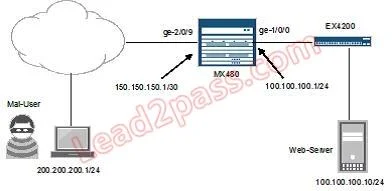
Referring to the exhibit, you want to block HTTP access to Web-Server from the subnet where Mal-User is located. All other traffic should be permitted. Which firewall filter configuration do you use?
The correct answer is D. [edit firewall family inet filter STOP-MAL-USER]. To block HTTP access from a specific subnet to a web server while permitting all other traffic, a firewall filter must explicitly match the source subnet, destination IP, and destination port 80 (HTTP), then reject, followed by a term that accepts all other traffic.
Question
Referring to the exhibit, you want to block HTTP access to Web-Server from the subnet where Mal-User is located. All other traffic should be permitted. Which firewall filter configuration do you use?
Exhibit
Options
- A[edit firewall family inet filter STOP-MAL-USER]
- B[edit firewall family inet filter STOP-MAL-USER]
- C[edit firewall family inet filter STOP-MAL-USER]
- D[edit firewall family inet filter STOP-MAL-USER]
How the community answered
(38 responses)- A5% (2)
- B3% (1)
- C13% (5)
- D79% (30)
Why each option
To block HTTP access from a specific subnet to a web server while permitting all other traffic, a firewall filter must explicitly match the source subnet, destination IP, and destination port 80 (HTTP), then reject, followed by a term that accepts all other traffic.
Without seeing the full configuration for this choice, it is presumed to be incorrect because it likely either misses the 'permit all other traffic' rule, misconfigures the matching criteria, or applies the wrong action for the specific block request.
Without seeing the full configuration for this choice, it is presumed to be incorrect because it likely either misses the 'permit all other traffic' rule, misconfigures the matching criteria, or applies the wrong action for the specific block request.
Without seeing the full configuration for this choice, it is presumed to be incorrect because it likely either misses the 'permit all other traffic' rule, misconfigures the matching criteria, or applies the wrong action for the specific block request.
The correct firewall filter configuration for this scenario would involve a first term matching the source address of `Mal-User` (192.168.10.0/24), the destination address of `Web-Server` (172.16.1.100), and destination port 80 (HTTP protocol), with a `then reject` action. A subsequent term with `then accept` would then permit all other traffic not matching the explicit block rule.
Concept tested: Firewall filter configuration (source/dest/port matching)
Source: https://www.juniper.net/documentation/us/en/software/junos/security/topics/topic-map-firewall-filters-overview.html
Topics
Community Discussion
No community discussion yet for this question.