
HPE7-A08 · Question #49
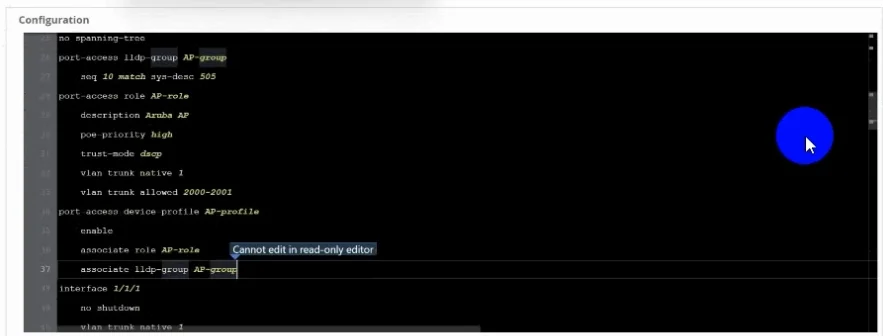
Refer to the exhibit. You are about to make a change to the HPE Aruba Networking CX switch in HPE Aruba Networking Central and are encountering the condition displayed above. What needs to be done…
The correct answer is B. Enable edit config mode using the gear icon. In HPE Aruba Networking Central, when you encounter a conflict or lock condition on a device, you must enable edit config mode via the gear icon to acquire an edit lock on the switch before changes can be pushed. The gear icon is the designated entry point for activating edit…
Question
Refer to the exhibit. You are about to make a change to the HPE Aruba Networking CX switch in HPE Aruba Networking Central and are encountering the condition displayed above. What needs to be done to make a change to the switch with multi-edit?
Exhibit
Options
- ASelect configuration status and enable edit config
- BEnable edit config mode using the gear icon
- COverride state
- DSelect the device in multi-edit and enable edit config mode
How the community answered
(33 responses)- A3% (1)
- B94% (31)
- C3% (1)
Explanation
In HPE Aruba Networking Central, when you encounter a conflict or lock condition on a device, you must enable edit config mode via the gear icon to acquire an edit lock on the switch before changes can be pushed. The gear icon is the designated entry point for activating edit config mode in the Central UI, and without it, the session remains read-only.
Why the distractors are wrong:
- A is wrong because "configuration status" is a view/monitoring panel, not a toggle that grants edit access - there is no "enable edit config" control within it.
- C (Override state) is a separate action used to forcibly clear an existing lock held by another admin; it doesn't initiate your own edit session and could disrupt someone else's work.
- D is wrong because while you do select a device for multi-edit, enabling edit config mode still requires the gear icon - simply selecting the device does not grant edit access on its own.
Memory tip: Think of the gear icon = "get in gear to edit." In Central, any configuration change starts with that gear - it's your key to unlocking the device for editing, just like a physical key before you can open a door.
Topics
Community Discussion
No community discussion yet for this question.