
HPE7-A02 · Question #69
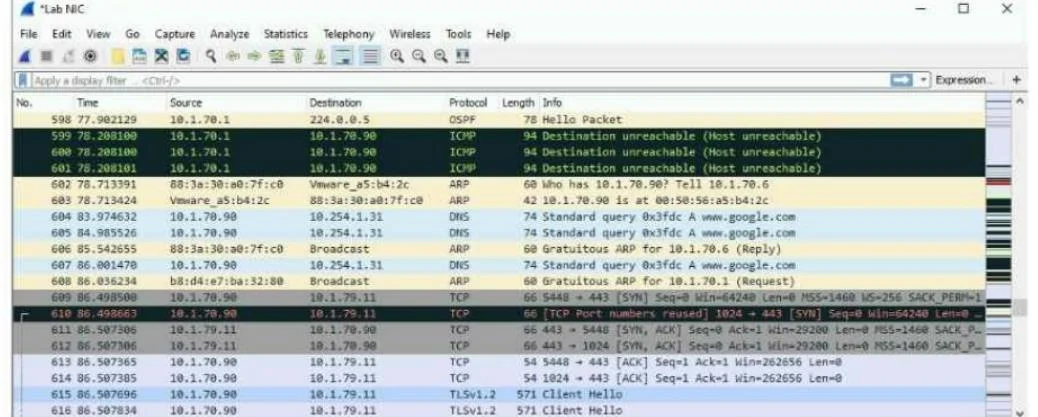
Refer to the exhibit. The exhibit shows a saved packet capture, which you have opened in Wireshark. You want to focus on the complete conversation between 10.1.70.90 and 10.1.79.11 that uses source…
The correct answer is D. Right-click one of the packets between those addresses and choose to follow the stream. Right-clicking a packet and selecting Follow Stream (TCP/UDP stream) is the fastest and most precise way to isolate a complete conversation in Wireshark - it automatically builds a display filter matching both endpoints and the specific stream, showing only those packets. Why…
Question
Refer to the exhibit. The exhibit shows a saved packet capture, which you have opened in Wireshark. You want to focus on the complete conversation between 10.1.70.90 and 10.1.79.11 that uses source port 5448. What is a simple way to do this in Wireshark?
Exhibit
Options
- AApply a capture filter that selects for both the 10.1.70.90 and 10.1.79.11 IP addresses.
- BClick the Source column and then the Destination column to sort the packets into the desired
- CApply a capture filter that selects for TCP port 5448.
- DRight-click one of the packets between those addresses and choose to follow the stream.
How the community answered
(16 responses)- B6% (1)
- C6% (1)
- D88% (14)
Explanation
Right-clicking a packet and selecting Follow Stream (TCP/UDP stream) is the fastest and most precise way to isolate a complete conversation in Wireshark - it automatically builds a display filter matching both endpoints and the specific stream, showing only those packets.
Why the distractors fail:
- A & C are wrong because capture filters only work before or during a live capture - they cannot be applied retroactively to a saved
.pcapfile already open in Wireshark. You'd need a display filter instead, not a capture filter. - B is wrong because sorting columns reorganizes rows visually but doesn't filter out unrelated traffic - you'd still see other conversations mixed in.
Memory tip: Think "follow the conversation" - Wireshark's Follow Stream feature is literally designed for exactly this use case. Also remember the key distinction: capture filters = applied before capture (live only), display filters = applied after capture (works on saved files). Any answer suggesting a capture filter on an already-saved file is automatically wrong.
Topics
Community Discussion
No community discussion yet for this question.