
HPE7-A02 · Question #124
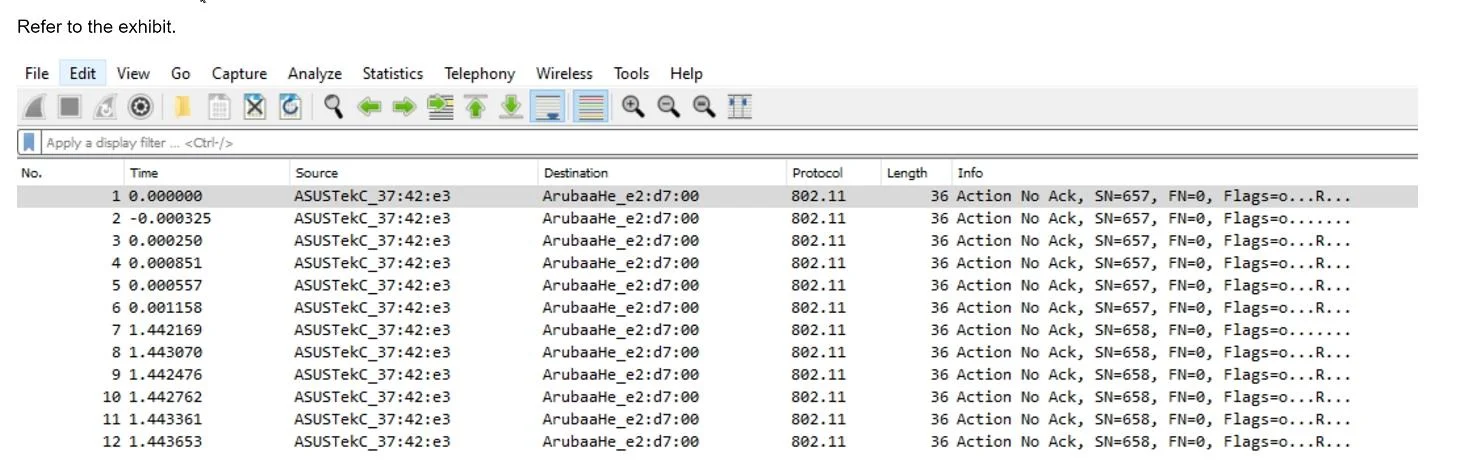
Refer to the Exhibit. You have downloaded a packet capture that you generated on HPE Aruba Networking Central. When you open the capture in Wireshark, you see the output shown in the exhibit. What…
The correct answer is A. Choose to decode UDP port 5555 packets as ARUBA_ERM and set the Aruba ERM Type to 0. To better interpret the packets shown in the Wireshark capture, you should choose to decode UDP port 5555 packets as ARUBA_ERM and set the Aruba ERM Type to 0. This configuration will allow Wireshark to properly decode and display the Aruba-specific encapsulated remote…
Question
Refer to the Exhibit. You have downloaded a packet capture that you generated on HPE Aruba Networking Central. When you open the capture in Wireshark, you see the output shown in the exhibit. What should you do in Wireshark so that you can better interpret the packets?
Exhibit
Options
- AChoose to decode UDP port 5555 packets as ARUBA_ERM and set the Aruba ERM Type to 0.
- BEdit preferences for IEEE 802.11 and chose to ignore the Protection bit with IV.
- CApply the following display filter: wlan.fc.type == 1.
- DEdit the Enabled Protocols and make sure that 802.11, GRE, and Aruba_ERM are enabled.
How the community answered
(13 responses)- A77% (10)
- C15% (2)
- D8% (1)
Explanation
To better interpret the packets shown in the Wireshark capture, you should choose to decode UDP port 5555 packets as ARUBA_ERM and set the Aruba ERM Type to 0. This configuration will allow Wireshark to properly decode and display the Aruba-specific encapsulated remote mirroring (ERM) packets, providing a clearer understanding of the traffic. 1. Decoding Protocols: Selecting the correct protocol decoding in Wireshark ensures that the captured packets are interpreted correctly, displaying the relevant information. 2. Aruba ERM: The packets in the capture are likely encapsulated remote mirroring (ERM) packets specific to Aruba, which require proper decoding settings in Wireshark. 3. Clear Interpretation: By setting the Aruba ERM Type to 0 and decoding the packets as ARUBA_ERM, you can view the encapsulated data accurately.
Topics
Community Discussion
No community discussion yet for this question.