
HPE7-A01 · Question #123
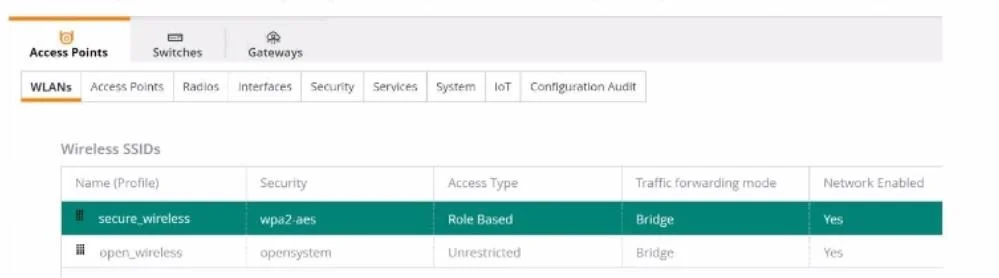
A company is in the planning stages to migrate to all their wireless domain laptops from WPA2 from WPA2 EAP-PEAP to EAP-TLS with machine Authentication. The administrator is testing a new Group…
The correct answer is C. Wireless Network Properties showing Security type: WPA2-Enterprise, Encryption type: AES, Authentication mode: User authentication (selected), Choose a network authentication method: Microsoft: Smart Card or other certificate (selected), 802.1X settings: User authentication. Important note: The stated correct answer of C appears to be an error in this question. The actual correct answer is D. Option D is correct because the scenario explicitly requires machine (computer) authentication with certificate-based EAP-TLS. D is the only choice that sets…
Question
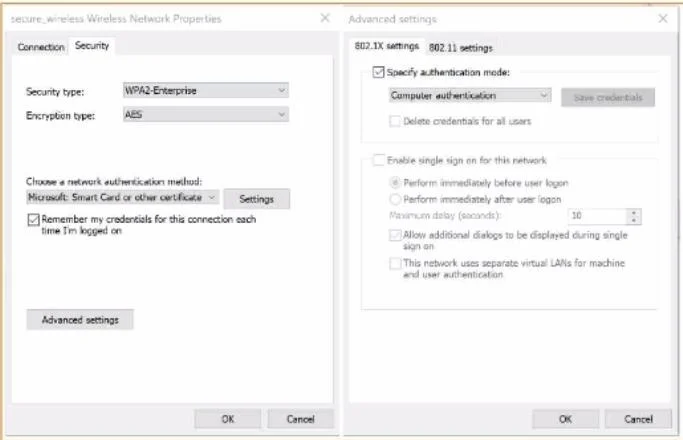
A company is in the planning stages to migrate to all their wireless domain laptops from WPA2 from WPA2 EAP-PEAP to EAP-TLS with machine Authentication. The administrator is testing a new Group Policy (GPO) that was pushed to only a few windows domain Laptops. The policy will configure the wireless profile to perform machine and certificate-based authentication. To support this new initiative the administrator also configured a new HPE Aruba Networking ClearPass 802.1X wireless service that only allows devices that successfully perform machine and certificate-based authentication. After successfully pushing the GPO, the Windows laptops are unable to join the configured `'secure_wireless'' SSID as shown below. Which configuration setting would resolve this issue? A. B. C. D.
Exhibits
Options
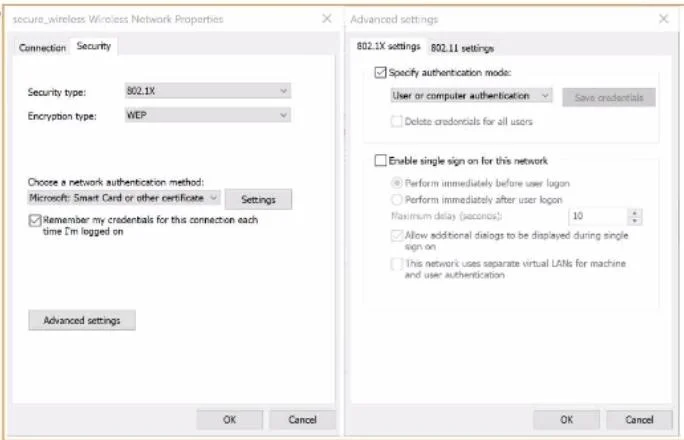
- AWireless Network Properties showing Security type: WEP, Authentication mode: User or computer authentication (User selected), Choose a network authentication method: Microsoft: Smart Card or other certificate (not selected), 802.1X settings: User authentication.
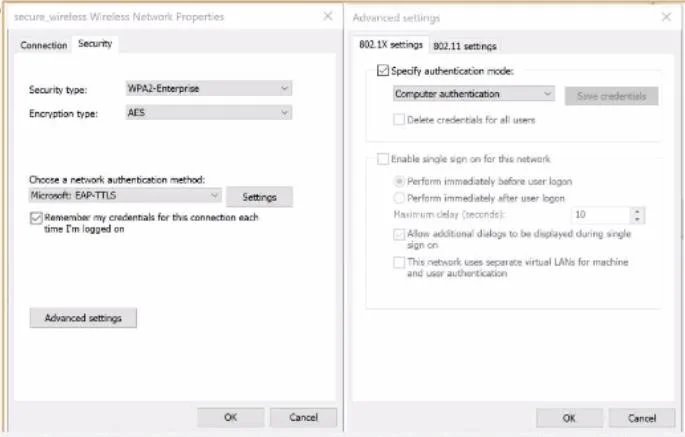
- BWireless Network Properties showing Security type: WPA2-Enterprise, Encryption type: AES, Authentication mode: Computer authentication (selected), Choose a network authentication method: Microsoft: EAP-TLS (selected), 802.1X settings: Computer authentication.
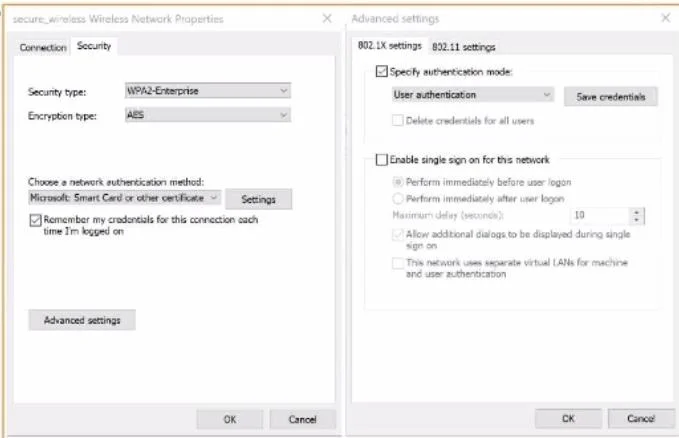
- CWireless Network Properties showing Security type: WPA2-Enterprise, Encryption type: AES, Authentication mode: User authentication (selected), Choose a network authentication method: Microsoft: Smart Card or other certificate (selected), 802.1X settings: User authentication.
- DWireless Network Properties showing Security type: WPA2-Enterprise, Encryption type: AES, Authentication mode: Computer authentication (selected), Choose a network authentication method: Microsoft: Smart Card or other certificate (selected), 802.1X settings: Computer authentication.
How the community answered
(17 responses)- A12% (2)
- B18% (3)
- C65% (11)
- D6% (1)
Explanation
Important note: The stated correct answer of C appears to be an error in this question. The actual correct answer is D.
Option D is correct because the scenario explicitly requires machine (computer) authentication with certificate-based EAP-TLS. D is the only choice that sets both the Authentication mode and 802.1X settings to "Computer authentication" while using "Microsoft: Smart Card or other certificate" - which is Windows' name for EAP-TLS. This matches what ClearPass is configured to accept.
Why the distractors fail:
- A fails immediately because WEP is a deprecated, insecure protocol - the scenario requires WPA2-Enterprise.
- B lists "Microsoft: EAP-TLS" as the EAP method, which is not a valid Windows UI option; the correct Windows label for EAP-TLS is "Microsoft: Smart Card or other certificate."
- C (the stated answer) selects User authentication throughout - but the scenario requires machine authentication, not user authentication. A machine-auth-only ClearPass policy would reject C's configuration because no user is logged in during pre-login machine auth.
Memory tip: In Windows wireless profiles, "Computer authentication" = machine auth (happens at boot, before login), and "Microsoft: Smart Card or other certificate" = EAP-TLS. When a question says "machine auth + certificates," you need both set to Computer, not User.
If this question appeared on a practice exam, the answer key likely contains a typo - flag it and remember D.
Topics
Community Discussion
No community discussion yet for this question.