
HPE6-A86 · Question #12
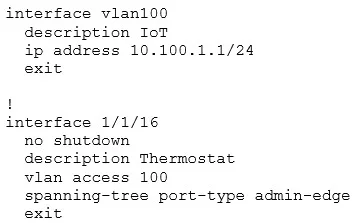
New IoT devices cannot obtain an IP address from a DHCP server (10.200.1.51). Based on the output below, what should you configure to resolve the issue?
The correct answer is B. Configure an IP helper for the DHCP server. The IoT clients in VLAN 100 send DHCP requests as broadcasts, which do not cross the Layer 3 boundary to reach a DHCP server in another subnet. Configuring a DHCP relay on interface vlan100 to forward DHCP requests to 10.200.1.51 allows the devices to obtain addresses.
Question
New IoT devices cannot obtain an IP address from a DHCP server (10.200.1.51). Based on the output below, what should you configure to resolve the issue?
Exhibit
Options
- AConfigure a static route to the DHCP server.
- BConfigure an IP helper for the DHCP server.
- CDisable Spanning Tree on the interface.
- DConfigure broadcast to unicast conversion.
How the community answered
(53 responses)- A8% (4)
- B85% (45)
- C4% (2)
- D4% (2)
Explanation
The IoT clients in VLAN 100 send DHCP requests as broadcasts, which do not cross the Layer 3 boundary to reach a DHCP server in another subnet. Configuring a DHCP relay on interface vlan100 to forward DHCP requests to 10.200.1.51 allows the devices to obtain addresses.
Topics
Community Discussion
No community discussion yet for this question.