
HPE6-A78 · Question #28
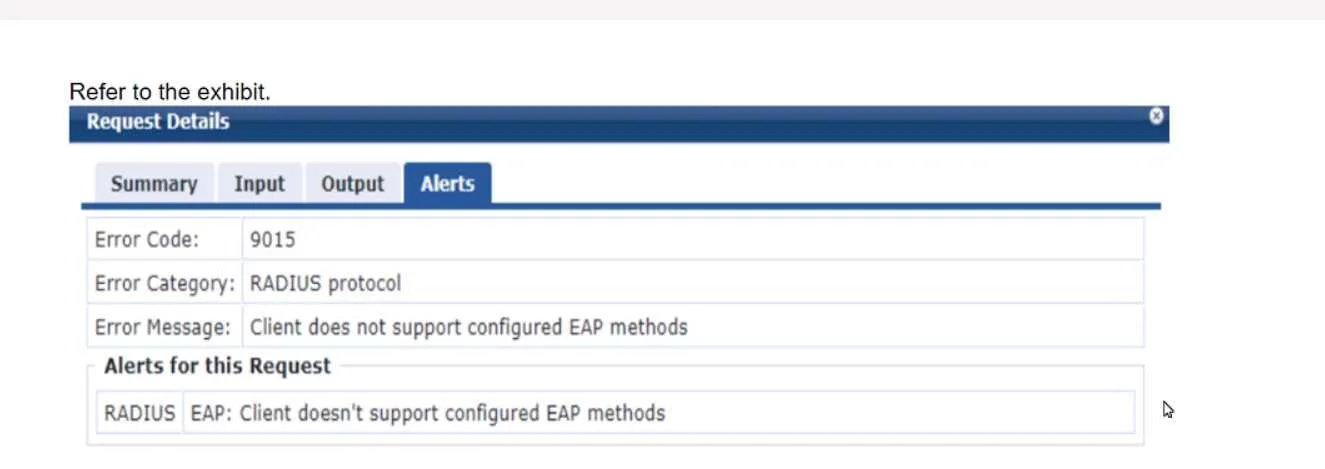
Refer to the exhibit. A company has an Aruba Instant AP cluster. A Windows 10 client is attempting to connect a WLAN that enforces WPA3-Enterprise with authentication to ClearPass Policy Manager…
The correct answer is B. whether the client has a valid certificate installed on it to let it support EAP-TLS. In the context of WPA3-Enterprise with EAP-TLS authentication, the error message "Client doesn't support configured EAP methods" suggests that the client is not able to complete the EAP-TLS authentication process. EAP-TLS requires that both the server (in this case, CPPM) and…
Question
Refer to the exhibit. A company has an Aruba Instant AP cluster. A Windows 10 client is attempting to connect a WLAN that enforces WPA3-Enterprise with authentication to ClearPass Policy Manager (CPPM). CPPM is configured to require EAP-TLS. The client authentication fails. In the record for this client's authentication attempt on CPPM, you see this alert. What is one thing that you check to resolve this issue?
Exhibit
Options
- Awhether the client has a third-party 802.1 X supplicant, as Windows 10 does not support EAP-TLS
- Bwhether the client has a valid certificate installed on it to let it support EAP-TLS
- Cwhether EAP-TLS is enabled in the SSID Profile settings for the WLAN on the IAP cluster
- Dwhether EAP-TLS is enabled in the AAA Profile settings for the WLAN on the IAP cluster
How the community answered
(35 responses)- A9% (3)
- B74% (26)
- C14% (5)
- D3% (1)
Explanation
In the context of WPA3-Enterprise with EAP-TLS authentication, the error message "Client doesn't support configured EAP methods" suggests that the client is not able to complete the EAP-TLS authentication process. EAP-TLS requires that both the server (in this case, CPPM) and the client have a valid certificate for mutual authentication. Windows 10 does support EAP- TLS natively, so options A, C, and D can be ruled out. The most likely reason for the authentication failure is that the client device does not have the correct client certificate installed, which is required to establish a TLS session with the server. Therefore, ensuring that the client has a valid certificate installed that matches the server's requirements is the correct step to resolve this issue. Reference: The need for valid certificates in EAP-TLS is outlined in RFC 5216 (The EAP-TLS Authentication Protocol), which specifies that both the client and server must present a valid certificate for EAP-TLS to succeed.
Topics
Community Discussion
No community discussion yet for this question.