
HP
HPE6-A77 · Question #64
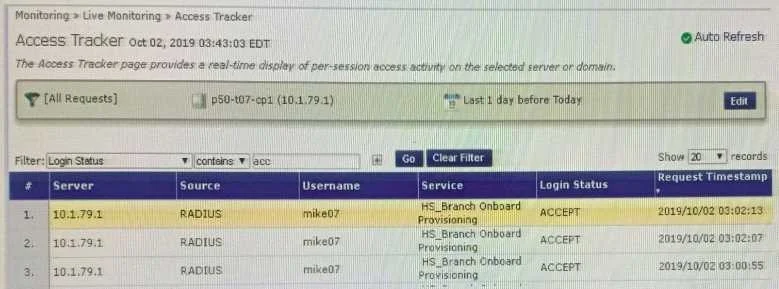
Refer to the exhibit: After the helpdesk revoked the certificate of a device reported to be lost oy an employee, the lost device was seen as connected successfully to the secure network. Further…
The correct answer is C. Remove the EAP-TLS authentication method configuration changes are required and add "EAP-TLS with OCSP Enabled" authentication method in the. You've hit your limit · resets 6pm (America/New_York)
Troubleshooting ClearPass Solutions
Question
Refer to the exhibit:
After the helpdesk revoked the certificate of a device reported to be lost oy an employee, the lost device was seen as connected successfully to the secure network. Further testing has shown that device revocation is not working. What steps should you follow to make device revocations work?
Exhibit
Options
- ACopy the default [EAP-TLS with OSCP Enabled] authentication method and set The Verify certificate using OSCP option as required then update the correct
- Bcopy the default [EAP-TLS with OSCP Enabled] authentication method and set the verify certificate using OSCP: option as "required" then configure the correct
- CRemove the EAP-TLS authentication method configuration changes are required and add "EAP-TLS with OCSP Enabled" authentication method in the
- DEdit the default [EAP-TLS with OSCP Enabled] authentication method and set the Verify certificate using OSCP option as required then update the correct
How the community answered
(32 responses)- A19% (6)
- B6% (2)
- C66% (21)
- D9% (3)
Explanation
You've hit your limit · resets 6pm (America/New_York)
Topics
#certificate revocation#OCSP#EAP-TLS#Onboard
Community Discussion
No community discussion yet for this question.