
HP
HPE6-A77 · Question #62
Refer to the exhibit: What could be causing the error message received on the OnGuard client?
The correct answer is D. The client's OnGuard Agent has not been configured with the correct Policy Manager Zone. You've hit your limit · resets 6pm (America/New_York)
Troubleshooting ClearPass Solutions
Question
Refer to the exhibit:
What could be causing the error message received on the OnGuard client?
Exhibit
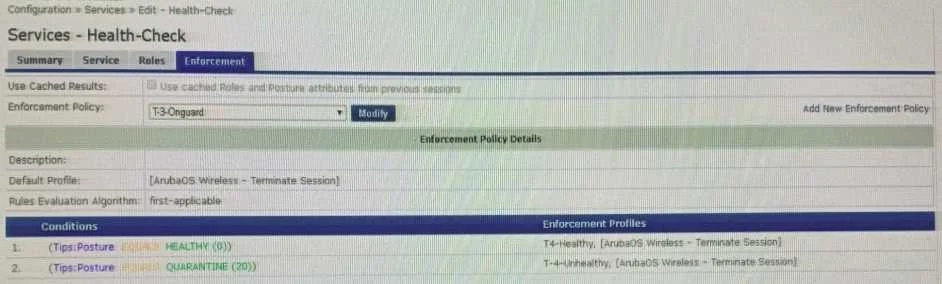
Options
- AThe Service Selection Rules for the service are not configured correctly
- BThe Web-Based Health Check service needs to be configured to use the Posture Policy
- CThere is a firewall policy not allowing the OnGuard Agent to connect to ClearPass
- DThe client's OnGuard Agent has not been configured with the correct Policy Manager Zone
How the community answered
(48 responses)- A15% (7)
- B2% (1)
- C6% (3)
- D77% (37)
Explanation
You've hit your limit · resets 6pm (America/New_York)
Topics
#OnGuard#Policy Manager Zone#posture assessment#agent configuration
Community Discussion
No community discussion yet for this question.