
HP
HPE6-A77 · Question #25
Refer to the exhibit: You have configured an Onboard portal for single SSID provision. During testing you notice that the QuickConnect Application did not display the "Connect" button, only the…
The correct answer is A. Check the network settings for the correct SSID name spelling. You've hit your limit · resets 6pm (America/New_York)
Troubleshooting ClearPass Solutions
Question
Refer to the exhibit:
You have configured an Onboard portal for single SSID provision. During testing you notice that the QuickConnect Application did not display the "Connect" button, only the finish button. To get connected the test user had to manually connect to the secure-HS-5007 SSID but was prompted for a username and password. Using the screenshots as a reference, how would you fix this issue?
Exhibit
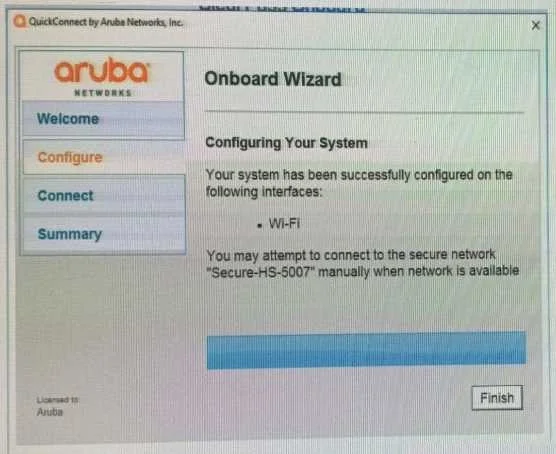
Options
- ACheck the network settings for the correct SSID name spelling.
- BChange the network settings to use EAP-TLS for the authentication protocol.
- CInstall a public signed HTTPs web server certificate on the ClearPass server.
- DConfigure the SSID to support both EAP-PEAP and EAP-TLS authentication method.
How the community answered
(35 responses)- A71% (25)
- B6% (2)
- C9% (3)
- D14% (5)
Explanation
You've hit your limit · resets 6pm (America/New_York)
Topics
#Onboard#QuickConnect#single SSID#network settings
Community Discussion
No community discussion yet for this question.