
HP
HPE6-A77 · Question #2
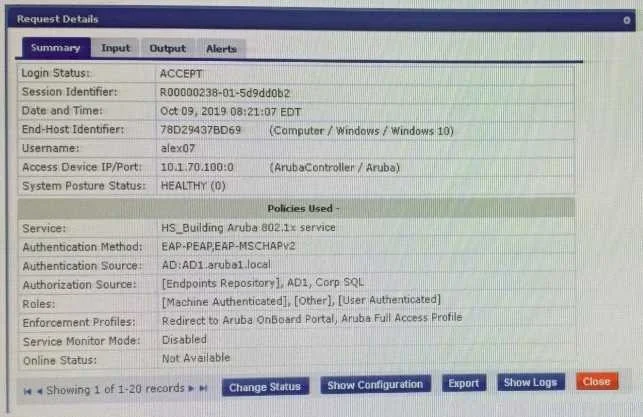
Refer to the exhibit: The customer configured an 802.1x service with different enforcement actions for personal and corporate laptops. The corporate laptops are always being redirected to the BYOD…
The correct answer is C. Modify the enforcement policy and re-order the EAP-PEAP with [user authenticated] rule to the last condition. D. Modify the enforcement policy and re-order the condition with Posture - Unknown as the fifth condition. You've hit your limit · resets 6pm (America/New_York)
Troubleshooting ClearPass Solutions
Question
Refer to the exhibit:
The customer configured an 802.1x service with different enforcement actions for personal and corporate laptops. The corporate laptops are always being redirected to the BYOD Portal. The customer has sent you the above screenshots. How would you resolve the issue? (Select two)
Exhibit
Options
- AModify the enforcement policy and change the rule evaluation algorithm to select first match
- BModify the enforcement policy and re-order the condition with posture not_equals to healthy as the sixth condition
- CModify the enforcement policy and re-order the EAP-PEAP with [user authenticated] rule to the last condition.
- DModify the enforcement policy and re-order the condition with Posture - Unknown as the fifth condition
- ERemove the EAP-PEAP with [user authenticated] condition for Onboard and create another service
How the community answered
(24 responses)- A4% (1)
- B17% (4)
- C71% (17)
- E8% (2)
Explanation
You've hit your limit · resets 6pm (America/New_York)
Topics
#enforcement policy#rule evaluation order#802.1x#BYOD portal redirect
Community Discussion
No community discussion yet for this question.