
HPE6-A77 · Question #13
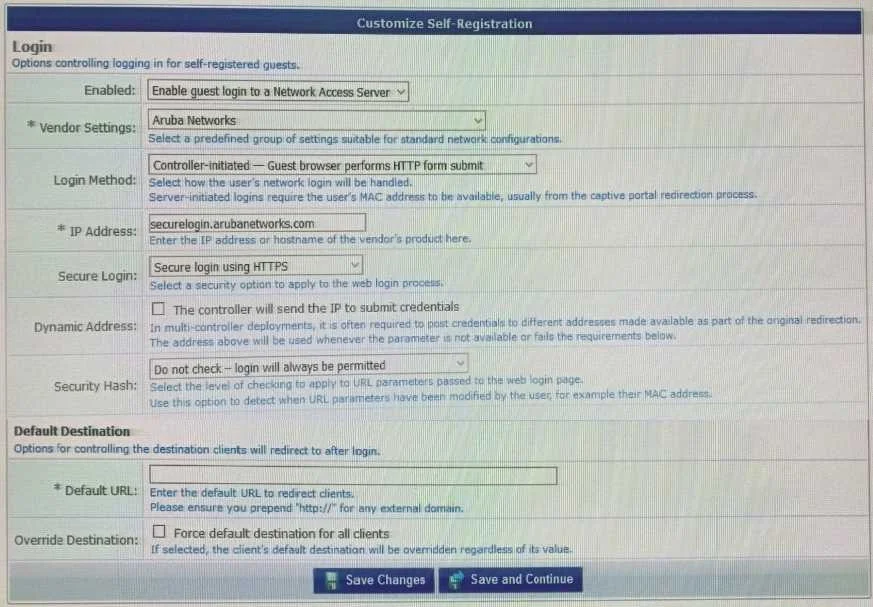
Refer to the exhibit: A customer with multiple Aruba Controllers has just installed a new certificate for "*.customerdomain com" on all Aruba Controllers. While testing the existing guest…
The correct answer is A. The authentication source mapping in the service is incorrect, it should be mapped as (Guest Device Repository) [Local SQL DB]. Option A is correct because ClearPass Guest Self-Registration stores all guest credentials in the Local SQL DB, accessed via the Guest Device Repository authentication source. If that source mapping in the service is misconfigured (e.g., pointing to Active Directory or another…
Question
Refer to the exhibit:
A customer with multiple Aruba Controllers has just installed a new certificate for "*.customerdomain com" on all Aruba Controllers. While testing the existing guest Self-Registration page the customer noticed that the logins are failing. While troubleshooting they are finding no entries in the Event Viewer or Access Tracker for the tests. Suspecting that the Aruba Controllers may not be properly posting the credentials from the guest browser, they open the NAS Vendor Settings for the Guest Self-Registration Page. From the screen shown, how can you fix the errors?
Exhibit
Options
- AThe authentication source mapping in the service is incorrect, it should be mapped as (Guest Device Repository) [Local SQL DB]
- BThe "IP Address" field needs to point to "guest.customerdomain.com" and not "login.customerdomain.com"
- CThe username used for authentication does not exist in the Guest User Database Create a new user and authenticate again.
- DThe Unique-Device-Count does not allow any Client devices. Update the Enforcement policy condition: Unique-Device-Count.
How the community answered
(18 responses)- A78% (14)
- B11% (2)
- C6% (1)
- D6% (1)
Explanation
Option A is correct because ClearPass Guest Self-Registration stores all guest credentials in the Local SQL DB, accessed via the Guest Device Repository authentication source. If that source mapping in the service is misconfigured (e.g., pointing to Active Directory or another external store), ClearPass cannot locate the guest accounts at all - and the failure can occur early enough in the authentication chain that no Access Tracker or Event Viewer entry is ever generated, which is exactly the symptom described.
Option B is a distractor targeting the certificate change, but the FQDN in the NAS Vendor Settings identifies the NAS device posting credentials, not the certificate subject - changing it to a different subdomain would not fix a source-mapping misconfiguration. Option C is incorrect because the issue is systemic (all logins failing, no logs), not a single missing user account. Option D is irrelevant because Unique-Device-Count is an enforcement policy condition evaluated after successful authentication, and the problem here is that authentication never completes.
Memory tip: "No logs = authentication source is so wrong the request dies before CPPM processes it - Guest users always live in the Local SQL DB, so always map to Guest Device Repository."
Topics
Community Discussion
No community discussion yet for this question.