
HPE6-A48 · Question #63
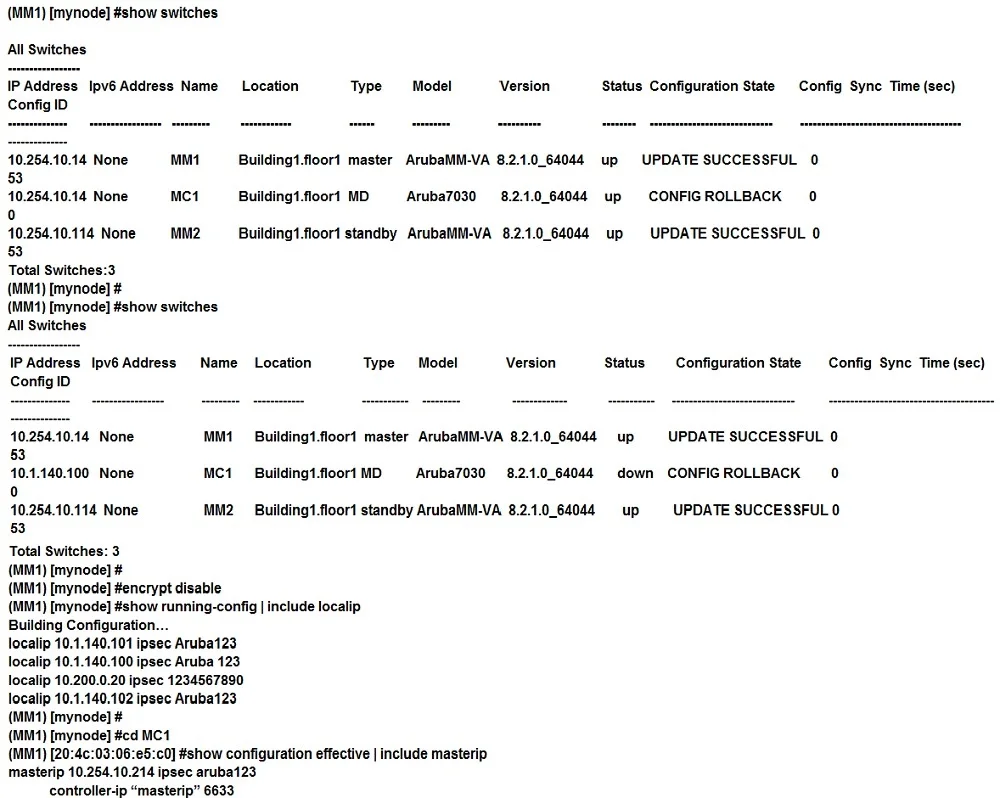
Refer to the exhibits. Exhibit 1 Exhibit 2 Exhibit 3 A network administrator deploys a Mobility Master (MM) pair with the VRRP VIP equal to 10.254.10.214, and attempts to associate MC1 to it. At…
Sign in or unlock HPE6-A48 to reveal the answer and full explanation for question #63. The question stem and answer options stay visible for context.
Question
Refer to the exhibits. Exhibit 1 Exhibit 2 Exhibit 3 A network administrator deploys a Mobility Master (MM) pair with the VRRP VIP equal to 10.254.10.214, and attempts to associate MC1 to it. At first, the integration appears to be successful. However after a few minutes the network administrator issues the show switches command and sees that the MC1 is down, even though the device is up and running. Every time the network administrator reboots the Mobility Controller (MC), the MC shows as being up and then it shows as being down. The network administrator gathers the information shown in the exhibits. What should the network administrator do to resolve this problem?
Exhibit
Options
- AChange the localip ipsec key to Aruba123 in the mynode device level from the MM, save, and reboot.
- BEnable disaster recovery mode in MC1 and change the masterip ipsec key to Aruba 123, save, and reboot.
- CChange the masterip ipsec key to Aruba123 in the device level from the MM, save, then reboot MC1.
- DWipe out the configuration in MC1 and reboot, then run the full-setup configuration dialog all over again.
Unlock HPE6-A48 to see the answer
You've previewed enough free HPE6-A48 questions. Unlock HPE6-A48 for full answers, explanations, the timed quiz mode, progress tracking, and the master PDF. Question stem and options stay visible so you can still see what's on the exam.