
HP
HPE6-A43 · Question #36
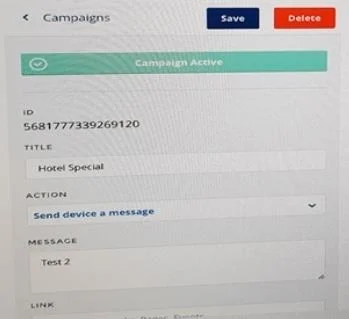
Refer to the exhibit. Which message displays on the device when the campaign shown in the exhibit is triggered?
Sign in or unlock HPE6-A43 to reveal the answer and full explanation for question #36. The question stem and answer options stay visible for context.
Deploying and Managing Mobile App Development and Integration
Question
Refer to the exhibit. Which message displays on the device when the campaign shown in the exhibit is triggered?
Exhibit
Options
- AHotel Special: Test 2
- BTest 2
- CHotel Special
- DMessage Test 2
Unlock HPE6-A43 to see the answer
You've previewed enough free HPE6-A43 questions. Unlock HPE6-A43 for full answers, explanations, the timed quiz mode, progress tracking, and the master PDF. Question stem and options stay visible so you can still see what's on the exam.
Topics
#campaigns#push notifications#Meridian notifications#campaign triggers