
HP
HPE3-U01 · Question #56
Refer to Exhibit. The PCs are not able to successfully establish bidirectional communication. What change must you deploy to enable the communication between PC-1 and PC-2?
The correct answer is C. change the Router's 1/1/1 interface IP to 172.16.30.254. You've hit your limit · resets 6pm (America/New_York)
Perform Basic Network Troubleshooting
Question
Refer to Exhibit. The PCs are not able to successfully establish bidirectional communication. What change must you deploy to enable the communication between PC-1 and PC-2?
Exhibit
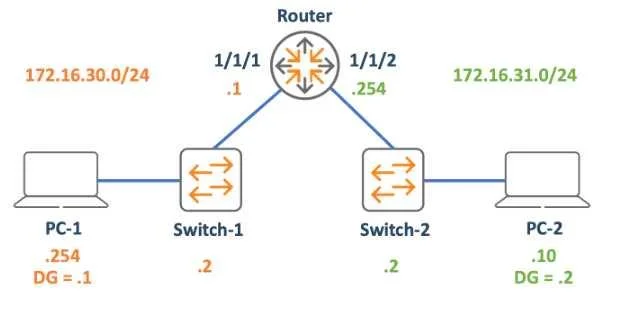
Options
- Achange PC-1 's default gateway to 172.16.30.2
- Bchange PC-1's IP address to 172.16.30.10
- Cchange the Router's 1/1/1 interface IP to 172.16.30.254
- Dchange PC-2's default gateway to 172.16.31.254
How the community answered
(39 responses)- A13% (5)
- B23% (9)
- C56% (22)
- D8% (3)
Explanation
You've hit your limit · resets 6pm (America/New_York)
Topics
#IP addressing#default gateway#routing#bidirectional communication
Community Discussion
No community discussion yet for this question.