
HP
HPE2-Z38 · Question #25
The network administrator is setting up a controller team. The team address is 192.168.100.100, and the three controllers are using 192.168.100.110, 192.168.100.111. and 192.168.100.112. The…
The correct answer is C. Move to the appropriate VLAN context and add the OpenFlow instance. See the full explanation below for the reasoning.
Question
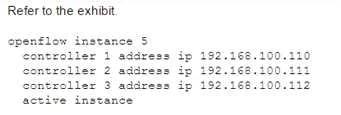
The network administrator is setting up a controller team. The team address is 192.168.100.100, and the three controllers are using 192.168.100.110, 192.168.100.111. and 192.168.100.112. The administrator is configuring a switch with only basic IP connectivity that can reach the controller team. The administrator starts to configure a new OpenFlow instance by using the commands shown in the exhibit. The instance fails to activate. How should the administrator change the configuration to enable it to activate?
Exhibit
Options
- AAdd one or more VLANs to the OpenFlow instance.
- BChange the IP address for all controllers to the team address.
- CMove to the appropriate VLAN context and add the OpenFlow instance.
- DChange the default setting for controller mode from single to team.
How the community answered
(37 responses)- A3% (1)
- B5% (2)
- C81% (30)
- D11% (4)
Community Discussion
No community discussion yet for this question.