
HPE2-T37 · Question #36
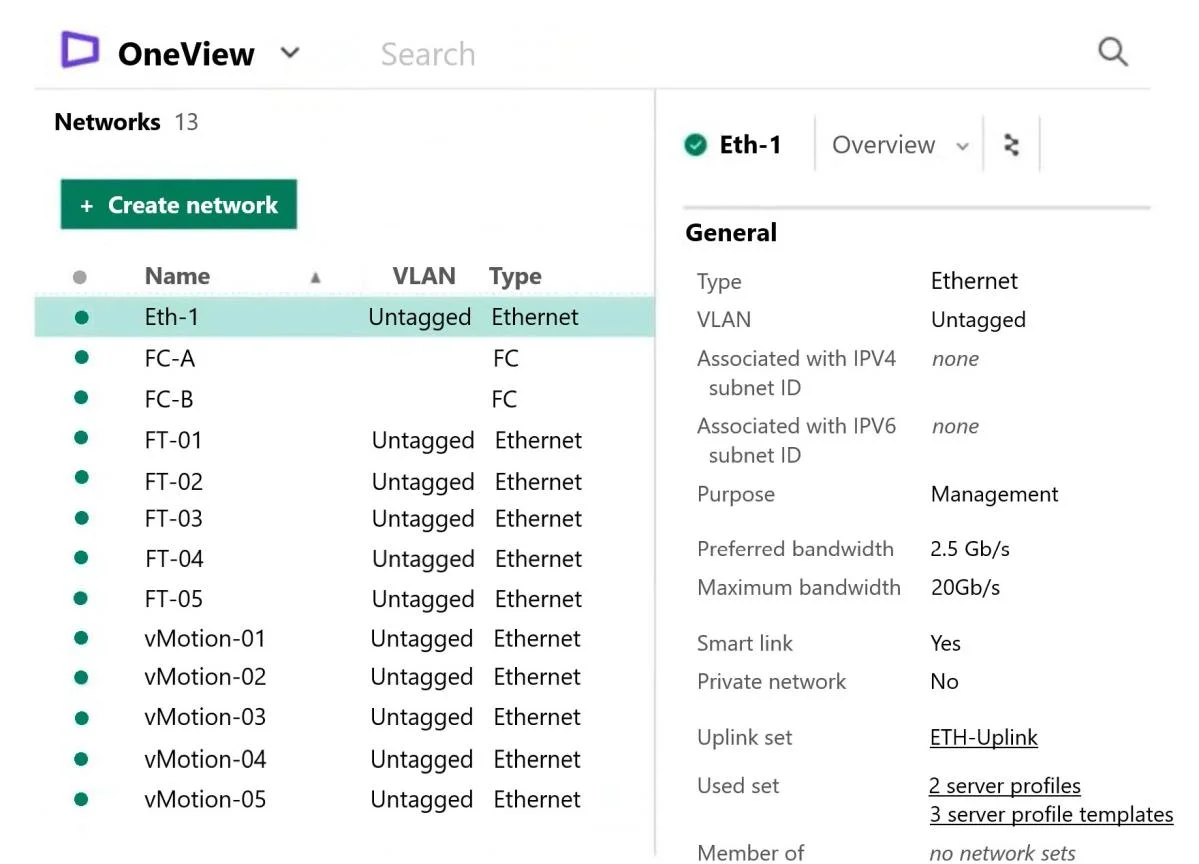
Refer to the exhibit. Your customer created multiple networks in HPE OneView, but only Eth-1 is available to be used within a server profile. What is a likely cause of this situation?
The correct answer is B. The other networks are not added to the Logical Interconnect Group configuration. In HPE OneView, networks must be added to a Logical Interconnect Group (LIG) before they can appear as available options in a server profile. Since Eth-1 is the only network visible, it's the only one that has been properly added to the LIG - the other networks exist in OneView…
Question
Refer to the exhibit. Your customer created multiple networks in HPE OneView, but only Eth-1 is available to be used within a server profile. What is a likely cause of this situation?
Exhibit
Options
- AThe other networks are not configured with the required Smart Link parameter.
- BThe other networks are not added to the Logical Interconnect Group configuration.
- CThe other networks have 'Private Network' selected, which hides them from Compute Modules
- DThe other networks are configured with a purpose other than General or Management.
How the community answered
(65 responses)- A6% (4)
- B80% (52)
- C3% (2)
- D11% (7)
Explanation
In HPE OneView, networks must be added to a Logical Interconnect Group (LIG) before they can appear as available options in a server profile. Since Eth-1 is the only network visible, it's the only one that has been properly added to the LIG - the other networks exist in OneView but haven't been associated with the LIG that governs which networks are available to compute modules.
Why the distractors are wrong:
- A - Smart Link is a network property that controls link state propagation, not network visibility in server profiles; it has no bearing on whether a network appears in the profile menu.
- C - HPE OneView does not have a "Private Network" toggle that hides networks from compute modules; this is a fabricated option.
- D - Network purpose (General, Management, iSCSI, FCoE, etc.) does affect how a network is used, but networks with purposes other than General/Management are still visible in server profiles when properly configured - they just appear in different sections.
Memory tip: Think of the LIG as a "whitelist gate" - a network must pass through the LIG before it can reach a server profile. No LIG entry = no visibility, regardless of how the network itself is configured.
Topics
Community Discussion
No community discussion yet for this question.