
HPE0-Y53 · Question #107
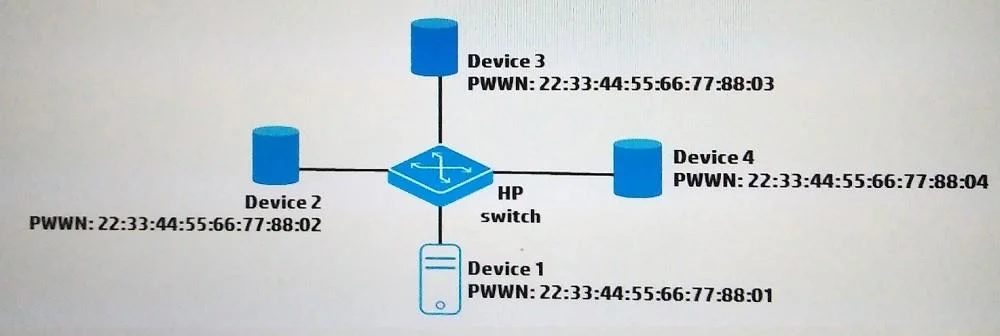
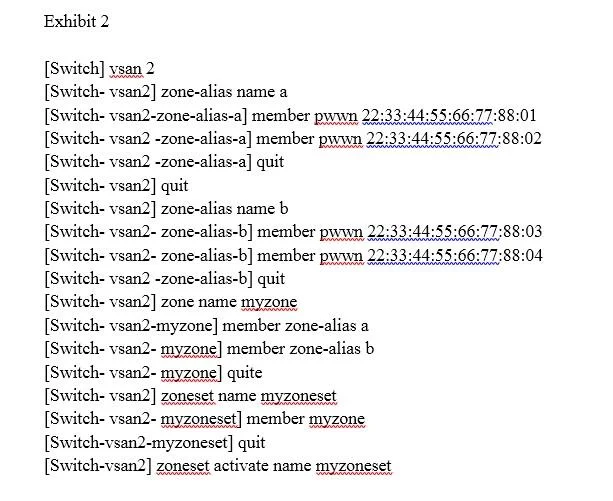
Refer to the exhibits. Exhibit 1 Assume that the HP Comware switch shown in Exhibit 1 is properly configured to place Devices 1-4 in VSAN 2. A network administrator enters the commands shown in…
The correct answer is D. All of the devices can communicate with the other devices. A zone alias is a logical group of ports or WWNs. You can simplify the process of creating zones by first specifying aliases, which eliminates the need for long lists of individual zone member A zone alias can be added to a zone; however, after the parent zone set has been…
Question
Refer to the exhibits. Exhibit 1 Assume that the HP Comware switch shown in Exhibit 1 is properly configured to place Devices 1-4 in VSAN 2. A network administrator enters the commands shown in Exhibit2. Which FCoE devices are allowed to communicate with each other?
Exhibits
Options
- ADevices 1 and 2 cam communicate with Devices 3 and 4. Device 1 cannot communicate with
- BDevices 2 and 4 can communicate with each other. Devices 1 and 3 cannot communicate with any
- CDevices 1 and 2 can communicate with each other but no other devices.
- DAll of the devices can communicate with the other devices.
How the community answered
(47 responses)- A15% (7)
- B2% (1)
- C6% (3)
- D77% (36)
Explanation
A zone alias is a logical group of ports or WWNs. You can simplify the process of creating zones by first specifying aliases, which eliminates the need for long lists of individual zone member A zone alias can be added to a zone; however, after the parent zone set has been activated, the alias dissolves into its member ports. Base.html?page=394
Topics
Community Discussion
No community discussion yet for this question.