
HPE0-S59 · Question #64
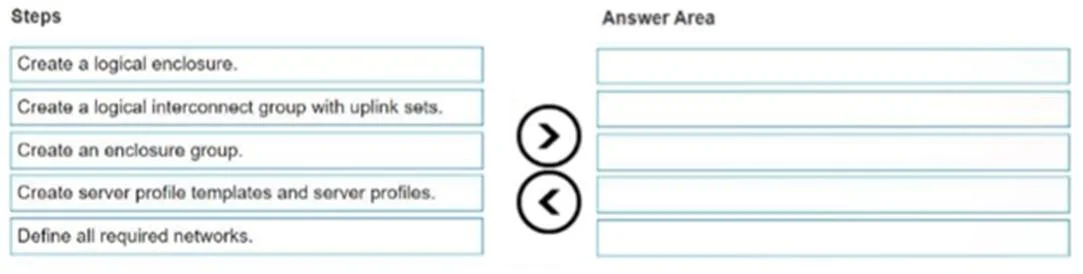
Drag and Drop Question You need to setup HPE Synergy frames after hardware components are discovered within HPE OneView. Put the steps to achieve this goal into the coned order in the answer area on…
The correct answer is Define all required networks.; Create a logical interconnect group with uplink sets.; Create an enclosure group.; Create a logical enclosure.; Create server profile templates and server profiles. HPE Synergy Frame Setup Order in HPE OneView The correct sequence follows a strict bottom-up dependency chain - each step creates a building block that the next step requires. --- Why This Order? HPE OneView uses a layered configuration model. You cannot reference an object…
Question
Exhibit
Answer Area
Drag items
Correct arrangement
- Define all required networks.
- Create a logical interconnect group with uplink sets.
- Create an enclosure group.
- Create a logical enclosure.
- Create server profile templates and server profiles.
Explanation
HPE Synergy Frame Setup Order in HPE OneView
The correct sequence follows a strict bottom-up dependency chain - each step creates a building block that the next step requires.
Why This Order?
HPE OneView uses a layered configuration model. You cannot reference an object that doesn't exist yet. Each layer depends on the one below it.
Step-by-Step Reasoning
1. Define all required networks
Networks (Ethernet, Fibre Channel, FCoE) must exist first because everything upstream references them. Uplink sets, server profiles, and connections all point to named network objects. If the networks don't exist, you have nothing to attach to uplinks or server NICs.
Common mistake: Trying to create a Logical Interconnect Group (LIG) first and then realizing you can't define uplink sets without pre-existing network objects.
2. Create a logical interconnect group (LIG) with uplink sets
The LIG defines the interconnect configuration policy - which uplink sets map to which networks, what link aggregation/LAG settings apply, and how the Virtual Connect modules behave. Uplink sets reference the networks you just defined.
The LIG is a template for interconnects; it gets applied when the Enclosure Group (and later Logical Enclosure) is created.
Common mistake: Forgetting to add uplink sets inside the LIG. Without them, servers have no external network connectivity.
3. Create an enclosure group
The Enclosure Group combines one or more LIGs and defines the enclosure-level configuration policy (number of frames, interconnect bay assignments, firmware baseline). It references the LIG(s) created in step 2.
Think of it as the blueprint for how a set of Synergy frames is wired and governed.
Common mistake: Creating the Enclosure Group before the LIG - OneView won't let you assign interconnect bay mappings without an existing LIG to reference.
4. Create a logical enclosure
The Logical Enclosure is the instantiation of the Enclosure Group against actual physical hardware (the discovered Synergy frames). It applies the Enclosure Group policy to the real chassis, configures the Virtual Connect modules, and establishes the logical fabric.
This is where configuration moves from template to live hardware.
Common mistake: Attempting to create the Logical Enclosure before the Enclosure Group exists, or before the physical frames have been discovered and claimed by OneView.
5. Create server profile templates and server profiles
Only now can you provision individual server blades. Server profiles assign networks, storage, BIOS settings, and firmware to specific servers. Server Profile Templates are reusable definitions; Server Profiles are the applied instances.
These reference networks and rely on the logical fabric being established by the Logical Enclosure.
Common mistake: Building profiles before the enclosure is fully configured - network connections in the profile will have nothing valid to connect to.
Summary Table
| Step | Object | Depends On |
|---|---|---|
| 1 | Networks | Nothing (foundation) |
| 2 | Logical Interconnect Group | Networks |
| 3 | Enclosure Group | LIG |
| 4 | Logical Enclosure | Enclosure Group + physical hardware |
| 5 | Server Profiles | Logical Enclosure + Networks |
The key mental model: policy/template objects are created top-down conceptually, but built bottom-up in practice - you always define the dependencies before the things that depend on them.
Topics
Community Discussion
No community discussion yet for this question.