
HP
HP2-Z37 · Question #1
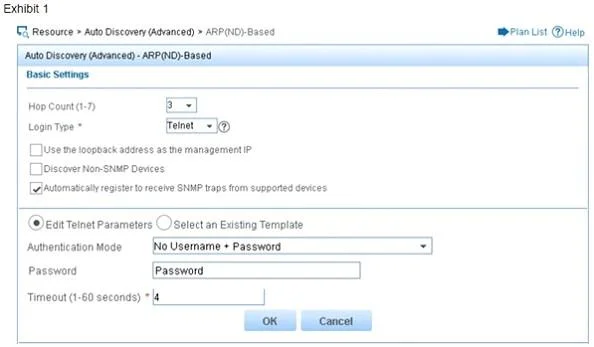
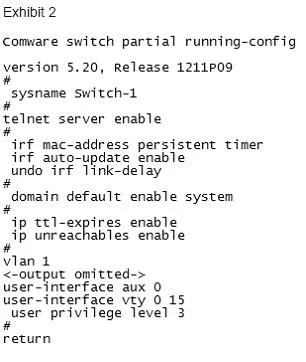
Refer to the exhibits. Exhibit 1 shows some of the discovery settings on HP intelligent Management Center (IMC). Exhibit 2 shows part of the running-config on an HPComware switch. What shouldthe…
The correct answer is A. Configure password authentication mode and a password on the Comware VTY 0-15 interfaces. See the full explanation below for the reasoning.
Question
Refer to the exhibits. Exhibit 1 shows some of the discovery settings on HP intelligent Management Center (IMC). Exhibit 2 shows part of the running-config on an HPComware switch. What shouldthe network administrator do to ensure that IMC can correctly configure this Comwareswitch?
Exhibits
Options
- AConfigure password authentication mode and a password on the Comware VTY 0-15 interfaces.
- BChange the IMC settings to use the default username, admin, and default password, admin
- CConfigure private and public keys for Telnet on the Comware switch.
- DConfigure scheme authentication mode on the Comware AUX 0 interface
How the community answered
(47 responses)- A72% (34)
- B17% (8)
- C9% (4)
- D2% (1)
Community Discussion
No community discussion yet for this question.