
HP2-Z34 · Question #36
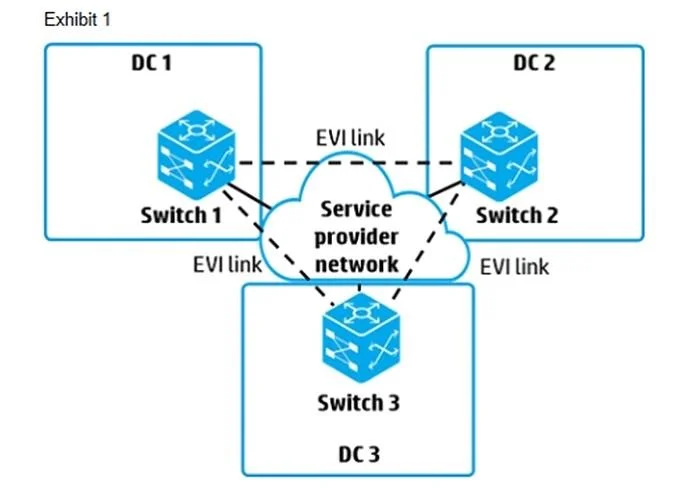
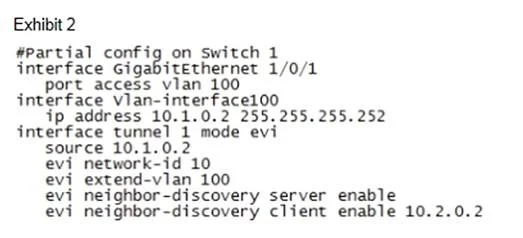
Refer to the exhibit. An EVI network is being set up as shown in Exhibit 1. Part of Switch 1's configuration is shown in Exhibit 2 All other switches are configured correctly and can reach each…
Sign in or unlock HP2-Z34 to reveal the answer and full explanation for question #36. The question stem and answer options stay visible for context.
Question
Refer to the exhibit. An EVI network is being set up as shown in Exhibit 1. Part of Switch 1's configuration is shown in Exhibit 2 All other switches are configured correctly and can reach each other. The EVI links should carry traffic in VLANs 4 to 20; however, when the administrator tries to ping a VLAN 4 device in DC 2 from DC 1. the ping fails. What should the administrator do?
Exhibits
Options
- AChange the tunnel source IP address to the Switch 1 router ID.
- BAdd tunnel destination IP addresses to the tunnel interface.
- CEither disable the neighbor-discovery server setting or remove the client setting
- DConfigure the tunnel interface to extend VLANs 4 to 20 instead of VLAN 100.
Unlock HP2-Z34 to see the answer
You've previewed enough free HP2-Z34 questions. Unlock HP2-Z34 for full answers, explanations, the timed quiz mode, progress tracking, and the master PDF. Question stem and options stay visible so you can still see what's on the exam.