nerdexam
HP

HP2-Z12 · Question #44

You check the startup-config on an HP A Series switch and find that the switch uses myconfig.cfg as the main startup-config and has no backup config. What happens if you use the undo startup…

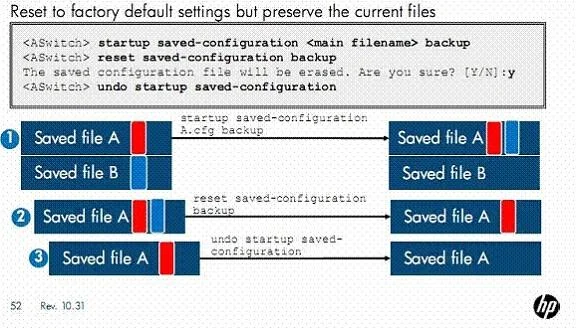
The correct answer is D. The myconfig.cfg file is retained in the switch's memory, but the switch returns to factory. Sometimes you will need to revert a switch to its factory-default settings, but the customer still wants to preserve the current startup-config file (or files). You can meet this requirement with one command when the switch has no backup startup-config. Simply enter the undo…

Switch Configuration Management

Question

You check the startup-config on an HP A Series switch and find that the switch uses myconfig.cfg as the main startup-config and has no backup config. What happens if you use the undo startup savedconfiguration command?

Exhibit
HP2-Z12 question #44 exhibit

Options

  • AThe myconfig.cfg file is deleted, and the switch returns to factory default settings at the next
  • BThe myconfig.cfg file becomes the backup startup-config, and the switch returns to factory
  • CThe myconfig.cfg file becomes the backup startup-config, and is booted at the next reboot
  • DThe myconfig.cfg file is retained in the switch's memory, but the switch returns to factory

How the community answered

(36 responses)
  • A
    17% (6)
  • B
    8% (3)
  • C
    3% (1)
  • D
    72% (26)

Explanation

Sometimes you will need to revert a switch to its factory-default settings, but the customer still wants to preserve the current startup-config file (or files). You can meet this requirement with one command when the switch has no backup startup-config. Simply enter the undo saved configuration command, which removes the main attribute from the main startup-config file, but preserves the file itself. When the switch reboots, it loads the factory default settings because no main or backup startupconfig is specified. The slide displays the proper commands for meeting this requirement when the customer's switch has both a main and a backup startup-config file. (The process is complicated slightly because there is no undo savedconfig backup command.) First, move the backup attribute from the backup startup-config to the main startupconfig by entering startup saved- configuration <filename> backup , specifying the filename of the main startup config. The former backup file is preserved in the flash memory but no longer plays a role in the boot process. The main startup-config file, file A, now has both the main and backup attributes, so you can enter reset saved-configuration backup to set the backup startupconfig to NULL without deleting the file. Finally, enter undo startup saved-configuration to take file A out of the boot process without deleting it. Now the switch will boot at the factory default settings, but the customer's configurations remain intact.

Topics

#HP A Series switch#startup-config#undo startup savedconfiguration#configuration management

Community Discussion

No community discussion yet for this question.

Full HP2-Z12 Practice