
HP0-Y52 · Question #15
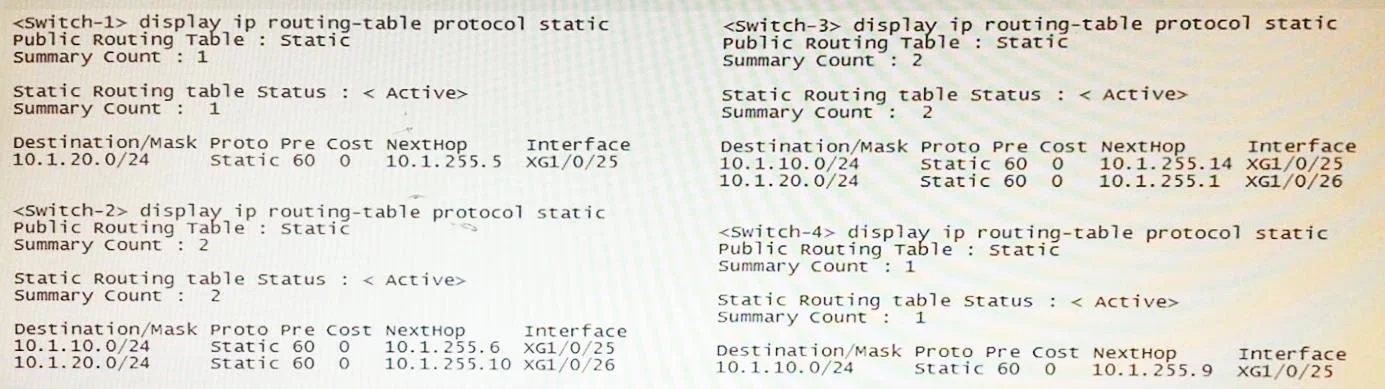
All of the switches in Exhibit 1 are routing switches. Exhibit 2 shows the routes configured on these switches. The direct (connected) routes are not shown, but assume that links are configured with…
Sign in or unlock HP0-Y52 to reveal the answer and full explanation for question #15. The question stem and answer options stay visible for context.
Question
All of the switches in Exhibit 1 are routing switches. Exhibit 2 shows the routes configured on these switches. The direct (connected) routes are not shown, but assume that links are configured with the IP addresses shown in Exhibit 1. The network administrator wants to protect communications between clients and servers in case Link 1 fails. What should the administrator do to protect these communications in this failover situation?
Exhibit
Options
- AAdd a redundant route to 10.1.10.0/24 on Switch-4 and a redundant route to 10.1.20.0/24 on
- BAdd a redundant route to 10.1.20.0/24 on Switch-1 and a redundant route to 10.1.20.0/24 on
- CAdd a redundant route to 10.1.10.0/24 on Switch-1 and a redundant route to 10.1.20.0/24 on
- DAdd a redundant route to 10.1.20.0/24 on Switch-1 and a redundant route to 10.1.10.0/24 on
Unlock HP0-Y52 to see the answer
You've previewed enough free HP0-Y52 questions. Unlock HP0-Y52 for full answers, explanations, the timed quiz mode, progress tracking, and the master PDF. Question stem and options stay visible so you can still see what's on the exam.