
HP0-Y49 · Question #28
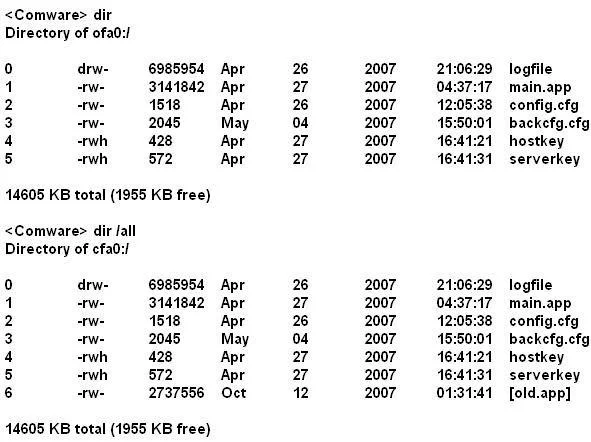
Refer to the exhibit. A network administrator is upgrading the operating system on an HP Comware switch. When copying the new image from a TFTP server to flash of the switch, the process fails…
The correct answer is C. Execute the reset recycle-bin command and perform the TFTP upgrade again. When you delete a file with HP switches, it moves thefile to the recycle bin and the file still occupies storage space. To permanently delete the file from the recycle bin, execute the reset recycle-bin command in the original directory of the file.
Question
Refer to the exhibit. A network administrator is upgrading the operating system on an HP Comware switch. When copying the new image from a TFTP server to flash of the switch, the process fails because there is not enough flash to store the new operating system. The new operating system is 3.2MB in size. The network administrator then executes the commands shown in the exhibit. Which action should the network administrator perform to solve this problem?
Exhibit
Options
- AReformat flash and execute the TFTP upgrade command.
- BExecute the clear Flash command and perform the TFTP upgrade again.
- CExecute the reset recycle-bin command and perform the TFTP upgrade again.
- DExecute the delete eld.app command and execute the TFTP upgrade command.
How the community answered
(33 responses)- A3% (1)
- B9% (3)
- C82% (27)
- D6% (2)
Explanation
When you delete a file with HP switches, it moves thefile to the recycle bin and the file still occupies storage space. To permanently delete the file from the recycle bin, execute the reset recycle-bin command in the original directory of the file.
Topics
Community Discussion
No community discussion yet for this question.