
HP0-S45 · Question #37
An administrator deployed HP OneView to the ESXi server managed by the vCenter Server. During the initial configuration, the administrator configured the wrong IP address and is unable to access the…
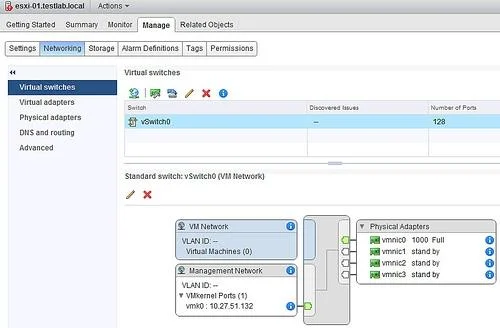
The correct answer is C. Log in to the ESXi server hosting HP OneView appliance using vSphere Web Client and change. Go to vCenter -> Hosts and Clusters Click a host in the left pane Click on the "Manage" tab Click on "Networking" Select the vSwitch you want to reconfigure.
Question
An administrator deployed HP OneView to the ESXi server managed by the vCenter Server. During the initial configuration, the administrator configured the wrong IP address and is unable to access the web interface. What should the integrator do to solve this problem?
Exhibit
Options
- ALog in to the HP OneView using SSH client, login in using root account and one time password,
- BLog in to the appliance using service IP address 169.254.1.1 and change management IP
- CLog in to the ESXi server hosting HP OneView appliance using vSphere Web Client and change
- DLog in to the vCenter server, open appliance local console, and change management IP address.
How the community answered
(27 responses)- A19% (5)
- B7% (2)
- C70% (19)
- D4% (1)
Explanation
Go to vCenter -> Hosts and Clusters Click a host in the left pane Click on the "Manage" tab Click on "Networking" Select the vSwitch you want to reconfigure.
Topics
Community Discussion
No community discussion yet for this question.