
HP
HP0-S36 · Question #5
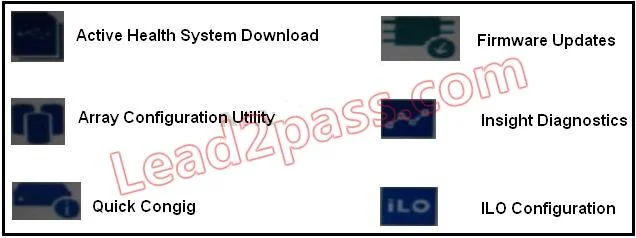
After booting Gen8 server into intelligent Provisioning and selecting Perform maintenance, Why is Firmware Update icon lighter than the other one the screenshot shown?
The correct answer is D. Firmware has just been updated. Normally the icons gray out when there are insufficient permissions to access it. In this case, the icon is not grayed which means that the firmware has just been updated and there are not more firmware updates to download.
BIOS/UEFI and System Configuration
Question
After booting Gen8 server into intelligent Provisioning and selecting Perform maintenance, Why is Firmware Update icon lighter than the other one the screenshot shown?
Exhibit
Options
- AThere are no initial networking parameters
- BThe system has not completed a full POST process
- CThe user has insufficient permissions
- DFirmware has just been updated
How the community answered
(26 responses)- A4% (1)
- B8% (2)
- C4% (1)
- D85% (22)
Explanation
Normally the icons gray out when there are insufficient permissions to access it. In this case, the icon is not grayed which means that the firmware has just been updated and there are not more firmware updates to download.
Topics
#Intelligent Provisioning#firmware update#maintenance UI#server provisioning
Community Discussion
No community discussion yet for this question.