
Huawei
H13-527_V5.0 · Question #212
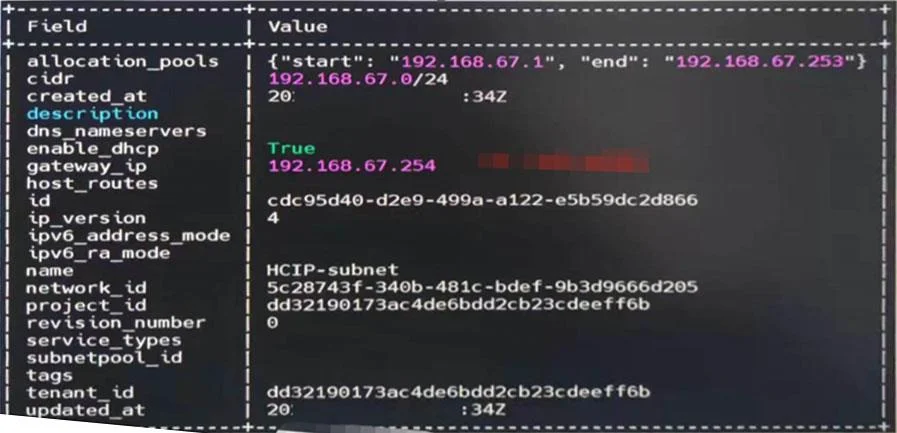
The engineer saw the subnet as shown in the figure below in OpenStack. Now he needs to adjust the configuration of the subnet. What are the following adjustment requirements and feasible commands?…
The correct answer is C. Modify the subnet gateway address to 192.168.67.1. neutron subnet-update --gateway D. Turn off the subnet DHCP function: neutron subnet-update--disab l e-chep ede952e9-499a-22-. See the full explanation below for the reasoning.
Question
The engineer saw the subnet as shown in the figure below in OpenStack. Now he needs to adjust the configuration of the subnet. What are the following adjustment requirements and feasible commands? (Multiple choice)
Exhibit
Options
- AModify the IP address pool range to start from 100: neutron subnet-update --allocation-pool start-
- BTurn off the subnet DHCP function: neutron subnet-update --enable-dhep-False cdc95d40-d2e9-
- CModify the subnet gateway address to 192.168.67.1. neutron subnet-update --gateway
- DTurn off the subnet DHCP function: neutron subnet-update--disab l e-chep ede952e9-499a-22-
How the community answered
(20 responses)- A5% (1)
- B15% (3)
- C80% (16)
Community Discussion
No community discussion yet for this question.