
H12-725_V4.0 · Question #176
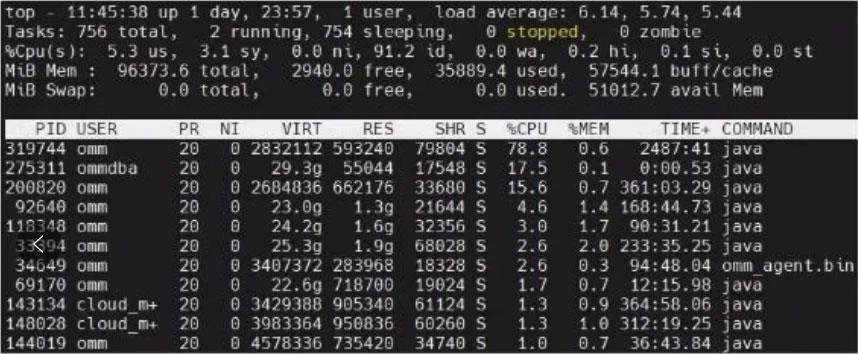
The output of the top command in a Linux system is displayed as shown in the figure. Which items are correct in the description of this output information? (Multiple choice)
The correct answer is A. PR represents process priority. The smaller the value, the higher the priority. B. PID represents the process ID, which is unique in the Linux system and cannot be repeated. C. %MEM represents the percentage of memory used by the process to the total physical memory D. CPU represents the CPU usage of the process, and its upper limit is 100%. All four options accurately describe fields shown in the top command output. PR (priority) in Linux follows an inverse scale - a PR value of 1 outranks a value of 20, so A is correct. PID (process ID) is guaranteed to be unique among all currently running processes; the kernel…
Question
The output of the top command in a Linux system is displayed as shown in the figure. Which items are correct in the description of this output information? (Multiple choice)
Exhibit
Options
- APR represents process priority. The smaller the value, the higher the priority.
- BPID represents the process ID, which is unique in the Linux system and cannot be repeated.
- C%MEM represents the percentage of memory used by the process to the total physical memory
- DCPU represents the CPU usage of the process, and its upper limit is 100%.
How the community answered
(27 responses)- A100% (27)
Explanation
All four options accurately describe fields shown in the top command output. PR (priority) in Linux follows an inverse scale - a PR value of 1 outranks a value of 20, so A is correct. PID (process ID) is guaranteed to be unique among all currently running processes; the kernel never assigns the same PID to two concurrent processes, confirming B. %MEM is calculated as the process's resident memory divided by total physical RAM and expressed as a percentage, making C correct.
Option D is marked correct in a single-core or per-CPU context: one process on one core can consume at most 100% of that core's capacity. However, be aware of a real-world nuance - on multi-core systems, top by default shows CPU usage per core, so a multi-threaded process can legitimately display values above 100% (e.g., 350% on a 4-core machine). Since the question treats the system as a single-CPU scenario, 100% is considered the upper limit here.
Since all choices are correct, there are no wrong distractors to debunk in this question - a deliberate exam design to test whether you know the material thoroughly enough to confirm every option.
Memory tip: Think of top's columns as "PPMC" - PID (unique ID), PR (lower = higher priority), %MEM (share of total RAM), %CPU (share of one core). Remembering that lower PR = higher priority is the most commonly tested trap on Linux exams.
Topics
Community Discussion
No community discussion yet for this question.