
H12-721 · Question #110
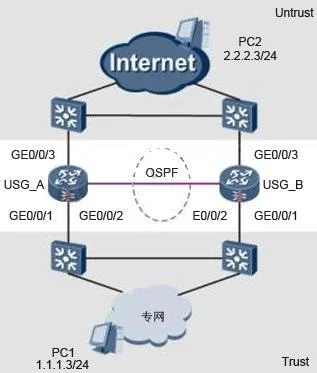
A USG standby scenario is shown in Figure. The service interface works in three steps, down the line connecting the router through an administrator to view, USG_A status is H RP_M [USG A], USG_B…
The correct answer is A. [USG_A] hrp ospf-cost adjust-enable. See the full explanation below for the reasoning.
Question
A USG standby scenario is shown in Figure. The service interface works in three steps, down the line connecting the router through an administrator to view, USG_A status is H RP_M [USG A], USG_B state HRP_S [USG_B ], but all the traffic is not completely passing through USG_A, half of the traffic also passes via USG_B. Which of the following configuration command can solve this problem? [USG_A] interface GigabitEthernet 0/0/1 [USG_A-GigabitEthernet 0/0/1] hrp track master [USG_A] interface GigabitEthernet 0/0/3 [USG_A-GigabitEthernet 0/0/3] hrp track master [USG_A] ospf 101 [USG_A-ospf -101] area 0 [USG_A-ospf-101-area-0.0.0.0] network 10.104.10.0 0.0.0.255 [USG_A-ospf-101-area-0.0.0.0] network 10.104.30.0 0.0.0.255 [USG_A] hrp interface GigabitEthernet 0/0/2 [USG_B] interface GigabitEthernet 0/0/1 [USG_B-GigabitEthernet 0/0/1] hrp track slave [USG_B] interface GigabitEthernet 0/0/3 [USG_B-GigabitEthernet 0/0/3] hrp track slave [USG_B] ospf 101 [USG_B] ospf 101 [USG_B-ospf -101] area 0 [USG_B-ospf-101-area-0.0.0.0] network 10.104.10.0 0.0.0.255 [USG_B-ospf-101-area-0.0.0.0] network 10.104.30.0 0.0.0.255 [USG_B] hrp interface GigabitEthernet 0/0/2
Exhibit
Options
- A[USG_A] hrp ospf-cost adjust-enable
- B[USG_B] interface GigabitEthernet 0/0/1
- Chrp preempt delay 60
- Dheartbeat port addresses are not released to the OSPF
How the community answered
(15 responses)- A80% (12)
- C7% (1)
- D13% (2)
Community Discussion
No community discussion yet for this question.