
GSNA · Question #33
You have to move the whole directory /foo to /bar. Which of the following commands will you use to accomplish the task?
The correct answer is C. mv /foo /bar. You will use the mv /foo /bar command to move the whole directory /foo to /bar. The mv command moves files and directories from one directory to another or renames a file or directory. mv must always be given at least two arguments. The first argument is given as a source file…
Question
You have to move the whole directory /foo to /bar. Which of the following commands will you use to accomplish the task?
Exhibit
Options
- Amv /bar /foo
- Bmv -R /foo /bar
- Cmv /foo /bar
- Dmv -r /bar /foo
How the community answered
(25 responses)- A8% (2)
- B12% (3)
- C76% (19)
- D4% (1)
Explanation
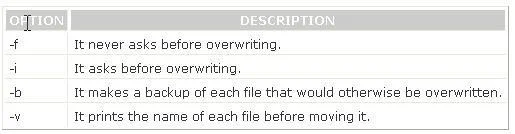
You will use the mv /foo /bar command to move the whole directory /foo to /bar. The mv command moves files and directories from one directory to another or renames a file or directory. mv must always be given at least two arguments. The first argument is given as a source file. The second argument is interpreted as the destination. If destination is an existing directory, the source file is moved to that directory with the same name as the source. If the destination is any other directory, the source file is moved and/or renamed to that destination name. Syntax : mv [options] source destination Some important options used with mv command are as follows: C:\Documents and Settings\user-nwz\Desktop\1.JPG Answer: A is incorrect. The mv /bar /foo command will move the whole /bar directory to the /foo Answer: B, D are incorrect. These are not valid Linux commands.
Topics
Community Discussion
No community discussion yet for this question.