
GSNA · Question #246
You work as a Network Administrator for Tech Perfect Inc. You have a laptop running Windows Vista Ultimate. You want to configure Windows Defender on your laptop so that it does not take any action…
Sign in or unlock GSNA to reveal the answer and full explanation for question #246. The question stem and answer options stay visible for context.
Question
You work as a Network Administrator for Tech Perfect Inc. You have a laptop running Windows Vista Ultimate. You want to configure Windows Defender on your laptop so that it does not take any action automatically whenever it scans malicious software. Rather, it should recommend the action and wait for your approval for taking any action. Which of the following actions will you take to accomplish the task?
Exhibit
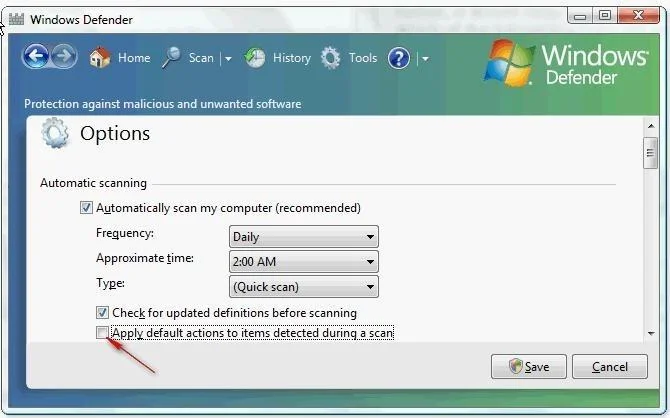
Options
- AClear the Use real-time protection check box in Defender Options
- BClear the Automatically scan my computer check box in Defender Options
- CSelect the Create a restore point before applying action to detected items check box in Defender
- DClear the Apply default actions to items detected during a scan check box in Defender Options.
Unlock GSNA to see the answer
You've previewed enough free GSNA questions. Unlock GSNA for full answers, explanations, the timed quiz mode, progress tracking, and the master PDF. Question stem and options stay visible so you can still see what's on the exam.