
GSNA · Question #148
You have purchased a laptop that runs Windows Vista Home Premium. You want to protect your computer from malicious applications, such as spyware, while connecting to the Internet. You configure…
Sign in or unlock GSNA to reveal the answer and full explanation for question #148. The question stem and answer options stay visible for context.
Question
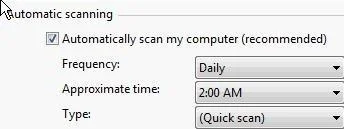
You have purchased a laptop that runs Windows Vista Home Premium. You want to protect your computer from malicious applications, such as spyware, while connecting to the Internet. You configure Windows Defender on your laptop to schedule scan daily at 2 AM as shown in the image below:
You want Windows Defender to scan the laptop for all the known spyware and other potentially unwanted software, including the latest one. You do not want to manually perform this task. Which of the following actions will you perform to accomplish the task?
Exhibit
Options
- ACreate a scheduled task to download definition files for Windows Defender every Sunday.
- BConfigure Windows Defender to use the definition file placed on the Microsoft Update site for
- CSelect the Check for updated definitions before scanning check box in the Automatic Scanning
- DClick the arrow beside the Help button Click the Check for updates option.
Unlock GSNA to see the answer
You've previewed enough free GSNA questions. Unlock GSNA for full answers, explanations, the timed quiz mode, progress tracking, and the master PDF. Question stem and options stay visible so you can still see what's on the exam.