
GCIH · Question #829
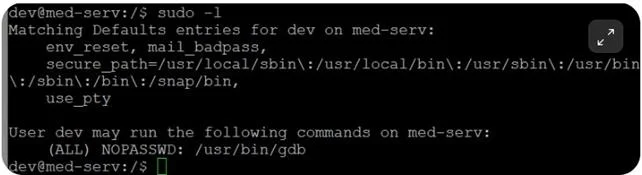
An attacker compromises a user account on a Linux host. Running "sudo -l" gives the output shown in the screenshot. Which of the following commands would the attacker run next to continue the attack…
The correct answer is C. sudo gdb -q. When sudo rights grant access to gdb, an attacker can run 'sudo gdb -q' and use gdb's built-in shell command to spawn an interactive root shell.
Question
An attacker compromises a user account on a Linux host. Running "sudo -l" gives the output shown in the screenshot. Which of the following commands would the attacker run next to continue the attack and gain shell access?
Exhibit
Options
- Aps -efw
- Blast -f /var/log/btmp
- Csudo gdb -q
- Dshell
How the community answered
(20 responses)- A10% (2)
- B5% (1)
- C70% (14)
- D15% (3)
Why each option
When sudo rights grant access to gdb, an attacker can run 'sudo gdb -q' and use gdb's built-in shell command to spawn an interactive root shell.
ps -efw lists running processes with full details and serves as a reconnaissance command, not a privilege escalation technique.
last -f /var/log/btmp displays failed login attempts and is used for log analysis, not for gaining elevated shell access.
If sudo -l reveals the user can run gdb as root, 'sudo gdb -q' launches gdb with elevated privileges. Once inside gdb, typing 'shell' invokes an interactive shell inheriting root permissions, effectively bypassing privilege restrictions. This is a documented GTFOBins privilege escalation technique that exploits debuggers permitted in the sudoers configuration.
'shell' is a subcommand typed inside an already-running gdb session and cannot be executed as a standalone terminal command.
Concept tested: Linux privilege escalation via sudo gdb GTFOBins
Source: https://gtfobins.github.io/gtfobins/gdb/
Topics
Community Discussion
No community discussion yet for this question.