
GCIH · Question #823
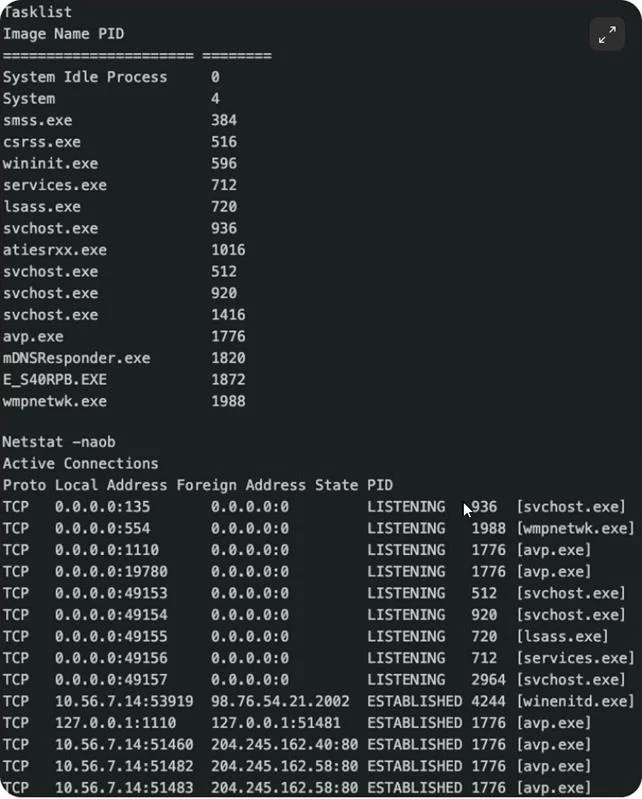
A Windows workstation was clean yesterday but now appears to be infected. Comparing the tasklist run at the last known good and the netstat run post event, which connection(s) in the netstat most…
The correct answer is D. The connection with winenitd.exe. The netstat output contains a connection from winenitd.exe, which is not a legitimate Windows process, indicating malware masquerading as a system binary.
Question
A Windows workstation was clean yesterday but now appears to be infected. Comparing the tasklist run at the last known good and the netstat run post event, which connection(s) in the netstat most likely indicate the host is infected?
Exhibit
Options
- AThe connections with svchost.exe
- BThe connection wmpnetwk.exe
- CThe connections with lsass.exe
- DThe connection with winenitd.exe
How the community answered
(61 responses)- A20% (12)
- B5% (3)
- C11% (7)
- D64% (39)
Why each option
The netstat output contains a connection from winenitd.exe, which is not a legitimate Windows process, indicating malware masquerading as a system binary.
svchost.exe is a legitimate Windows Service Host process that routinely makes network connections on behalf of hosted services.
wmpnetwk.exe is the legitimate Windows Media Player Network Sharing Service binary and is expected to appear in network connections when media sharing is enabled.
lsass.exe is the legitimate Local Security Authority Subsystem Service and, while its abuse can indicate an attack, it is a known Windows process.
winenitd.exe is not a real Windows system process - it mimics the naming convention of legitimate Windows binaries (such as wininit.exe) to blend in, a technique classified as masquerading (MITRE ATT&CK T1036). Its presence in a netstat connection on a previously clean host is a strong indicator of compromise.
Concept tested: Malware process masquerading detection via netstat
Source: https://attack.mitre.org/techniques/T1036/
Topics
Community Discussion
No community discussion yet for this question.