
GCIH · Question #801
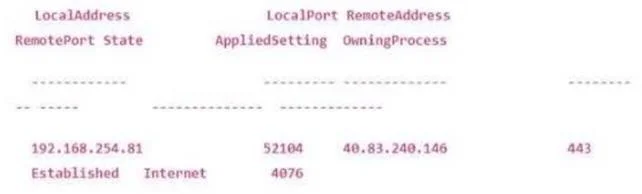
Which Windows command cruted the output below?
The correct answer is B. netstat -an | findstr /i "established". The netstat -an | findstr command displays all active network connections with numeric addresses and filters the output to show only ESTABLISHED TCP connections.
Question
Which Windows command cruted the output below?
Exhibit
Options
- Aget-nettcpconnection -state established
- Bnetstat -an | findstr /i "established"
- Cnetsh lan show tracing
- Dget-netiphttpsstate | select-object*
How the community answered
(21 responses)- B90% (19)
- C5% (1)
- D5% (1)
Why each option
The netstat -an | findstr command displays all active network connections with numeric addresses and filters the output to show only ESTABLISHED TCP connections.
Get-NetTCPConnection -State Established is a valid PowerShell alternative, but its output is formatted as a PowerShell object table with different column headers and spacing than the classic netstat output.
The command 'netstat -an' lists all TCP and UDP connections using numeric IP addresses and port numbers without resolving hostnames, producing the classic column-based output showing local address, foreign address, and state. Piping it through 'findstr /i "established"' performs a case-insensitive filter that isolates only rows showing an ESTABLISHED state, which matches the typical output format shown in this type of question.
netsh lan show tracing displays the configuration and status of LAN tracing settings and has no relevance to listing active TCP connection states.
Get-NetIPHttpsState retrieves the status of the IP HTTPS tunneling interface used for DirectAccess or VPN connectivity, not general TCP connection information.
Concept tested: netstat command filtering for established TCP connections
Source: https://learn.microsoft.com/en-us/windows-server/administration/windows-commands/netstat
Topics
Community Discussion
No community discussion yet for this question.