
GCIH · Question #607
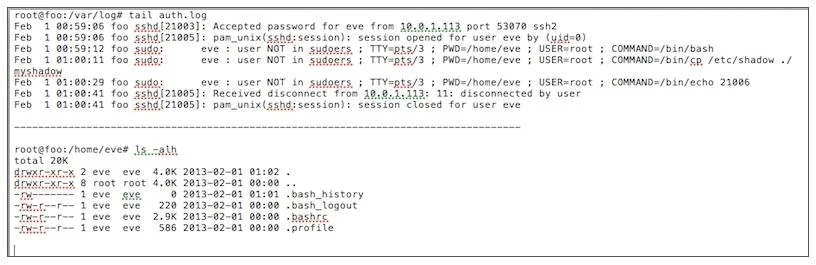
Examine the image below. Based on the log file and directory entry below why was the .bash_history file empty after Eve terminated her session?
The correct answer is C. Eve escalated her privileges to a super user and deleted the contents of the bash history file. An empty .bash_history file after a session indicates deliberate anti-forensic activity, most likely privilege escalation followed by history file truncation or deletion.
Question
Examine the image below. Based on the log file and directory entry below why was the .bash_history file empty after Eve terminated her session?
Exhibit
Options
- ASSH does not create a bash history file when a non-root user connects to a Linux system
- BBy copying the /etc/passwd and /etc/shadow files, Eve was able to sudo rm -rf her user directory
- CEve escalated her privileges to a super user and deleted the contents of the bash history file
- DEve terminated her bash session by echoing the PID into the kill command resulting in the history
How the community answered
(21 responses)- A5% (1)
- B24% (5)
- C57% (12)
- D14% (3)
Why each option
An empty .bash_history file after a session indicates deliberate anti-forensic activity, most likely privilege escalation followed by history file truncation or deletion.
SSH creates a bash history file for all interactive users regardless of whether they are root; the HISTFILE variable and shell session type determine history logging, not SSH itself.
Copying /etc/passwd and /etc/shadow is a credential harvesting technique used for offline cracking and does not grant the ability to remove a user home directory via sudo rm -rf.
With elevated (root or sudo) privileges, Eve could truncate or delete the contents of .bash_history using commands such as 'cat /dev/null > ~/.bash_history' or 'history -c', which require no special directory permissions. The log file and directory entry visible in the question would reflect this superuser activity, leaving the file empty upon session termination.
Killing a bash process via its PID using the kill command causes abnormal termination but does not prevent history from being written to disk; bash writes history on normal exit, and an abrupt kill would leave any already-written history intact.
Concept tested: Anti-forensic bash history clearing via privilege escalation
Source: https://www.gnu.org/software/bash/manual/bash.html#Bash-History-Facilities
Topics
Community Discussion
No community discussion yet for this question.