
FCSS_SASE_AD-24 · Question #28
Refer to the exhibit. A company has a requirement to inspect all the endpoint internet traffic on FortiSASE, and exclude Google Maps traffic from the FortiSASE VPN tunnel and redirect it to the…
The correct answer is C. Configure the Google Maps FQDN as a split tunneling destination on the FortiSASE endpoint profile. To meet the requirement of inspecting all endpoint internet traffic on FortiSASE while excluding Google Maps traffic from the FortiSASE VPN tunnel and redirecting it to the endpoint's physical interface, you should configure split tunneling. Split tunneling allows specific…
Question
Refer to the exhibit. A company has a requirement to inspect all the endpoint internet traffic on FortiSASE, and exclude Google Maps traffic from the FortiSASE VPN tunnel and redirect it to the endpoint physical Interface. Which configuration must you apply to achieve this requirement?
Exhibit
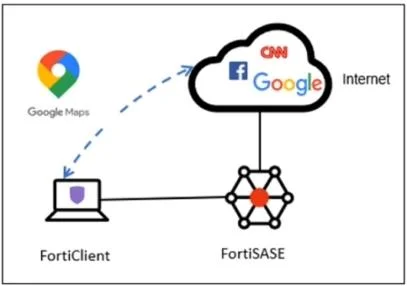
Options
- AExempt the Google Maps FQDN from the endpoint system proxy settings.
- BConfigure a static route with the Google Maps FQDN on the endpoint to redirect traffic
- CConfigure the Google Maps FQDN as a split tunneling destination on the FortiSASE endpoint profile.
- DChange the default DNS server configuration on FortiSASE to use the endpoint system DNS.
How the community answered
(41 responses)- A2% (1)
- B5% (2)
- C83% (34)
- D10% (4)
Explanation
To meet the requirement of inspecting all endpoint internet traffic on FortiSASE while excluding Google Maps traffic from the FortiSASE VPN tunnel and redirecting it to the endpoint's physical interface, you should configure split tunneling. Split tunneling allows specific traffic to bypass the VPN tunnel and be routed directly through the endpoint's local interface. Split Tunneling Configuration: Split tunneling enables selective traffic to be routed outside the VPN tunnel. By configuring the Google Maps Fully Qualified Domain Name (FQDN) as a split tunneling destination, you ensure that traffic to Google Maps bypasses the VPN tunnel and uses the endpoint's local interface Implementation Steps: Access the FortiSASE endpoint profile configuration. Add the Google Maps FQDN to the split tunneling destinations list. This configuration directs traffic intended for Google Maps to bypass the VPN tunnel and be routed directly through the endpoint's physical network interface.
Topics
Community Discussion
No community discussion yet for this question.