
FCSS_NST_SE-7.6 · Question #93
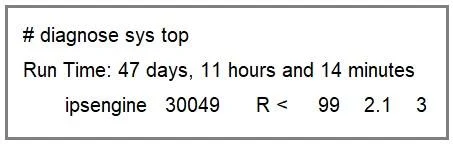
Refer to the exhibit. FortiGate is showing continuous high CPU usage. During a maintenance window the CLI command diagnose sys top displays the output shown in the exhibit. The CLI command diagnose…
The correct answer is C. Disable IPS on internal-to-internal policies. By turning off IPS inspection on purely internal traffic you immediately remove that load from the ipsengine daemon and drop CPU usage - no need to wait for signature tweaks or engine restarts.
Question
Refer to the exhibit. FortiGate is showing continuous high CPU usage. During a maintenance window the CLI command diagnose sys top displays the output shown in the exhibit. The CLI command diagnose test application ipsmonitor 5 was run but the CPU usage by daemon ipsengine did not drop. What immediate action can you take to reduce the CPU usage effectively?
Exhibit
Options
- AMonitor if there is a traffic surge.
- BRestart all IPS engines.
- CDisable IPS on internal-to-internal policies.
- DReview the IPS signatures enabled on the active IPS profiles.
How the community answered
(47 responses)- A11% (5)
- B23% (11)
- C60% (28)
- D6% (3)
Explanation
By turning off IPS inspection on purely internal traffic you immediately remove that load from the ipsengine daemon and drop CPU usage - no need to wait for signature tweaks or engine restarts.
Topics
Community Discussion
No community discussion yet for this question.