
FCSS_NST_SE-7.6 · Question #61
Refer to the exhibit, which shows one way communication of the downstream FortiGate with the upstream FortiGate within a Security Fabric. What three actions must you take to ensure successful…
The correct answer is A. You must authorize the downstream FortiGate on the root FortiGate. C. Ensure TCP port 8013 is not blocked along the way. D. You must enable Security Fabric/Fortitelemetry on the receiving interface of the upstream. Authorize the downstream FortiGate on the root FortiGate. Only registered/authorized devices can join the Security Fabric. Ensure TCP port 8013 is not blocked along the path. Port 8013 carries the Fabric control/telemetry session, so it must be open end‑to‑end. Enable Security…
Question
Refer to the exhibit, which shows one way communication of the downstream FortiGate with the upstream FortiGate within a Security Fabric. What three actions must you take to ensure successful communication? (Choose three.)
Exhibit
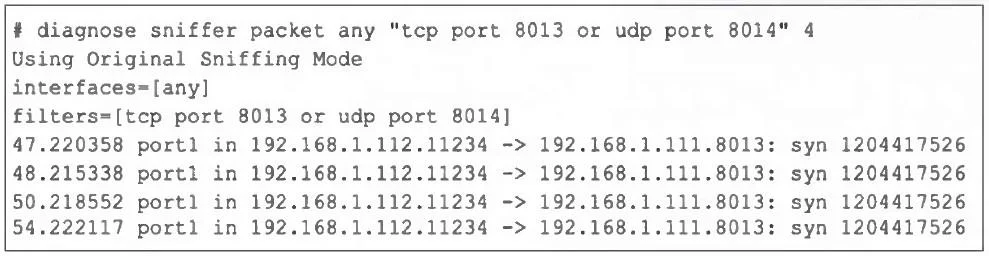
Options
- AYou must authorize the downstream FortiGate on the root FortiGate.
- BFortiGate must not be in NAT mode.
- CEnsure TCP port 8013 is not blocked along the way.
- DYou must enable Security Fabric/Fortitelemetry on the receiving interface of the upstream
- EEnsure the port for Neighbor Discovery has been changed.
How the community answered
(47 responses)- A79% (37)
- B6% (3)
- E15% (7)
Explanation
Authorize the downstream FortiGate on the root FortiGate. Only registered/authorized devices can join the Security Fabric. Ensure TCP port 8013 is not blocked along the path. Port 8013 carries the Fabric control/telemetry session, so it must be open end‑to‑end. Enable Security Fabric/FortiTelemetry on the upstream FortiGate's receiving interface. Telemetry must be activated on the interface that accepts the downstream FortiGate's
Topics
Community Discussion
No community discussion yet for this question.