
Fortinet
FCSS_NST_SE-7.6 · Question #34
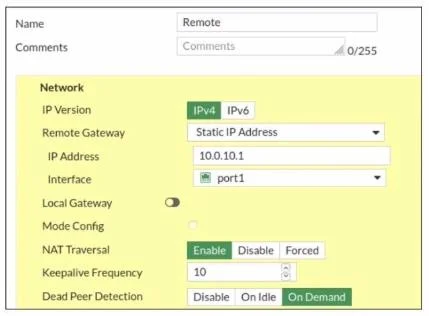
Refer to the exhibit, which contains a screenshot of some phase 1 settings. The VPN is not up. To diagnose the issue, the administrator enters the following CLI commands on an SSH session on…
The correct answer is A. The administrator must also run the command diagnose debug enable. You've hit your limit · resets 1pm (America/New_York)
Resolve IPsec VPN Issues
Question
Refer to the exhibit, which contains a screenshot of some phase 1 settings. The VPN is not up. To diagnose the issue, the administrator enters the following CLI commands on an SSH session on FortiGate:
However, the IKE real-time debug does not show any output. Why?
Exhibit
Options
- AThe administrator must also run the command diagnose debug enable.
- BThe debug shows only error messages. If there is no output, then the phase 1 and phase 2
- CThe log-filter setting is incorrect. The VPN traffic does not match this filter.
- DReplace diagnose debug application ike -1 with diagnose debug application ipsec -1.
How the community answered
(43 responses)- A74% (32)
- B14% (6)
- C5% (2)
- D7% (3)
Explanation
You've hit your limit · resets 1pm (America/New_York)
Topics
#IKE real-time debug#diagnose debug enable#VPN troubleshooting#phase 1
Community Discussion
No community discussion yet for this question.